#!/bin/bash
# ultimate.sh for duron
# Based on Wonder Shaper v1.1a
echo "/usr/sbin/ultimate.sh:  "

# Please read the README before filling out these values.
# Set the following values to somewhat less than your actual download
# and upload speed in kilobits.  Also set the device that is to be shaped.

# Run a speed test from netspeed.stanford.edu with no shaping enabled.
# Multiply the reported rates in Kb/s by ~.95 and enter them here:
# Example: DNLINK=4.76M*.95 = 4522
#          UPLINK=444.26K*.95 = 422
# Run the stanford test again.  Note: stanford uses high ports.
# Tweak during heavy upload so that each affected class has a small backlog but
# as few dropped packets as possible.  Interactive must NEVER backlog!
# If heavy downloads affect uploads, tweak IMQ so there is a small backlog but
# as few dropped packets as possible.
# Watch the logs for "some class has too small rate" even with quantum set.
# Stanford is in class 30; egress rate 36% ceil 92%, ingress rate 57% ceil 92%
# Download w/HTB is plenty (5.2x), don't tweak.
# Upload w/UPLINK=470 -> range 416 - 420 = ~85% of uCEIL.  Try for 90% - 91%.
Showing posts with label script. Show all posts
Showing posts with label script. Show all posts
Thursday, September 8, 2011
ultimate.sh

fw_function
#-----------------------
# FONCTIONS Firewall
# guibo@guibo.com
# version 1.2
# tested on slk
#-----------------------
load_module() {
IP_MODULES=`/sbin/lsmod | awk '{print $1}' | /bin/grep '^ip' | grep $1`
if [ -z "$IP_MODULES" ]; then
if [ -e $PATH_modules/$1.$EXTENSION_module ]; then
/sbin/insmod $PATH_modules/$1.$EXTENSION_module
else
echo " - MUST HAVE Compiled kernel $1 support"
fi
fi
}
load_module_q() {
IP_MODULES=`/sbin/lsmod | awk '{print $1}'`
if [ -z "$IP_MODULES" ]; then
if [ -e $PATH_modules_q/$1.$EXTENSION_module ]; then
/sbin/insmod $PATH_modules_q/$1.$EXTENSION_module
else
echo " - MUST HAVE Compiled kernel $1 support"
fi
fi
}
# FONCTIONS Firewall
# guibo@guibo.com
# version 1.2
# tested on slk
#-----------------------
load_module() {
IP_MODULES=`/sbin/lsmod | awk '{print $1}' | /bin/grep '^ip' | grep $1`
if [ -z "$IP_MODULES" ]; then
if [ -e $PATH_modules/$1.$EXTENSION_module ]; then
/sbin/insmod $PATH_modules/$1.$EXTENSION_module
else
echo " - MUST HAVE Compiled kernel $1 support"
fi
fi
}
load_module_q() {
IP_MODULES=`/sbin/lsmod | awk '{print $1}'`
if [ -z "$IP_MODULES" ]; then
if [ -e $PATH_modules_q/$1.$EXTENSION_module ]; then
/sbin/insmod $PATH_modules_q/$1.$EXTENSION_module
else
echo " - MUST HAVE Compiled kernel $1 support"
fi
fi
}
Wednesday, September 7, 2011
mikrotik hardcoded
1. Lan card ada 2
2. Alokasi IP address pada Mikrotik Hotspot Gateway :
- to_hotspot ip public
- to_hotspot 10.10.0.1/16
2. Alokasi IP address pada Mikrotik Hotspot Gateway :
- to_hotspot ip public
- to_hotspot 10.10.0.1/16
/ip firewall filter add chain=block-forward action=accept protocol=icmp icmp-options=8:0 limit=1,0 comment=”Allow ICMP”
/ip
firewall filter add chain=block-forward action=log tcp-flags=syn
protocol=tcp limit=5/1m,0 log-prefix=”Firewalled packet:” comment=”# Log
Forward”
/ip
firewall filter add chain=block-forward action=log protocol=icmp
icmp-options=8:0 limit=10/1h,0 log-prefix=”PING of Death ???” comment=”#
Log PING of Death”
/ip firewall filter add chain=block-forward action=drop src-address=169.254.0.0/16 comment=”# Block bad IP address”
/ip firewall filter add chain=block-forward action=drop src-address=224.0.0.0/3
/ip firewall filter add chain=block-forward action=drop src-address=224.0.0.0/4
/ip firewall filter add chain=block-forward action=drop src-address=240.0.0.0/5
/ip firewall filter add chain=block-forward action=drop src-address=248.0.0.0/5
/ip firewall filter add chain=block-forward action=drop src-address=255.255.255.255
/ip firewall filter add chain=block-forward action=drop connection-state=invalid comment=”# Drop invalid connections”
/ip firewall filter add chain=block-input action=accept protocol=icmp icmp-options=8:0 limit=5,0 comment=”# Allow ICMP”
/ip
firewall filter add chain=block-input action=log protocol=icmp
icmp-options=8:0 limit=10/1h,0 log-prefix=”PING of Death ???” comment=”#
Log PING of Death”
/ip
firewall filter add chain=block-input action=log tcp-flags=syn
protocol=tcp limit=5/1m,0 log-prefix=”Firewalled packet:” comment=”# Log
input”
/ip firewall filter add chain=block-input action=drop protocol=icmp comment=”# Block PING of Death”
/ip
firewall filter add chain=block-input action=drop
in-interface=to_internet src-address=10.0.0.0/8 comment=”# Interface
facing Public Internet Inbound Section RFC 1918″
/ip firewall filter add chain=block-input action=drop in-interface=to_internet src-address=202.91.11.6
/ip firewall filter add chain=block-input action=drop in-interface=to_internet src-address=192.168.0.0/16
/ip firewall filter add chain=block-input action=drop in-interface=to_internet src-address=202.91.8.160/29
/ip firewall filter add chain=block-input action=drop src-address=0.0.0.0/8
/ip firewall filter add chain=input action=jump jump-target=block-input comment=”# Jump to block-input”
/ip firewall filter add chain=forward action=jump jump-target=block-forward comment=”# Jump to block-forward”
/ip firewall filter add chain=forward action=jump jump-target=block-ddos protocol=udp comment=”# Jump to block-ddos”
/ip firewall filter add chain=forward action=jump jump-target=block-service comment=”# Jump to block-service”
/ip
firewall filter add chain=block-service action=drop p2p=all-p2p
comment=”# Block ports you don’t want it insert here ..:: drop p2p ::..”
/ip
firewall filter add chain=block-service action=drop
out-interface=to_internet dst-port=5050 protocol=tcp comment=”..:: drop
yahoo messenger ::..”
/ip
firewall filter add chain=block-service action=drop
out-interface=to_internet dst-port=6666-7000 protocol=tcp comment=”..::
drop irc ::..”
/ip firewall filter add chain=block-input action=drop src-address=127.0.0.0/8
/ip firewall filter add chain=block-input action=drop src-address=169.254.0.0/16
/ip firewall filter add chain=block-input action=drop src-address=172.16.0.0/12
/ip firewall filter add chain=block-input action=drop src-address=192.0.2.0/24
/ip firewall filter add chain=block-input action=drop src-address=204.152.64.0/23
/ip firewall filter add chain=block-input action=drop src-address=224.0.0.0/3
/ip firewall filter add chain=block-input action=drop src-address=224.0.0.0/4
/ip firewall filter add chain=block-input action=drop src-address=240.0.0.0/5
/ip firewall filter add chain=block-input action=drop src-address=248.0.0.0/5
/ip firewall filter add chain=block-input action=drop src-address=255.255.255.255
/ip
firewall filter add chain=block-input action=drop
in-interface=to_internet src-address=202.91.8.167 comment=”# Block Smurf
Attack on all interface”
/ip firewall filter add chain=block-input action=drop in-interface=to_internet src-address=202.91.11.7
/ip firewall filter add chain=block-input action=drop in-interface=to_hotspot src-address=10.10.255.255
/ip firewall filter add chain=block-input action=drop in-interface=to_proxy src-address=192.168.100.255
/ip firewall filter add chain=block-input action=drop dst-port=113 protocol=tcp comment=”# Block Ident”
/ip firewall filter add chain=block-input action=drop fragment=yes comment=”# Block IP Frags”
/ip
firewall filter add chain=block-input action=drop
ipv4-options=loose-source-routing comment=”# Blocked source routed
packets lsrr and ssrr”
/ip firewall filter add chain=block-input action=drop ipv4-options=strict-source-routing
/ip
firewall filter add chain=block-input action=reject
reject-with=tcp-reset in-interface=to_internet dst-port=80 protocol=tcp
comment=”# Reject connection from internet to port 80”
/ip
firewall filter add chain=block-forward action=reject
reject-with=tcp-reset tcp-flags=syn,ack connection-state=new
protocol=tcp comment=”# Reject Bad TCP”
/ip firewall filter add chain=block-forward action=drop protocol=icmp comment=”# Block PING of Death”
/ip
firewall filter add chain=block-input action=drop
in-interface=to_internet dst-port=23 protocol=tcp comment=”# Block
Telnet come from Internet”
/ip
firewall filter add chain=block-input action=drop
in-interface=to_hotspot dst-port=23 protocol=tcp comment=”# Block Telnet
come from Hotspot”
/ip firewall filter add chain=block-forward action=drop dst-port=137-139 protocol=tcp comment=”# Block Netbios Sessions tcp”
/ip firewall filter add chain=block-input action=drop dst-port=137-139 protocol=tcp comment=”# Block Netbios Sessions tcp”
/ip firewall filter add chain=block-input action=drop dst-port=137-139 protocol=udp comment=”# Block Netbios Sessions udp”
/ip firewall filter add chain=block-forward action=drop dst-port=135-139 protocol=udp comment=”# Block Netbios Sessions udp”
/ip firewall filter add chain=block-ddos action=return limit=16,32
/ip firewall filter add chain=block-ddos action=log log-prefix=”DDOS ATTACK:”
/ip firewall filter add chain=block-ddos action=drop limit=16,32
/ip firewall filter add chain=input action=jump jump-target=block-ddos protocol=udp comment=”# Jump to block-ddos”
/ip
firewall filter add chain=tcp-flags action=jump jump-target=bad-flags
tcp-flags=fin,!ack protocol=tcp comment=”# tcp-flags jumpt to bad-flags”
/ip firewall filter add chain=tcp-flags action=jump jump-target=bad-flags tcp-flags=psh,!ack protocol=tcp
/ip firewall filter add chain=tcp-flags action=jump jump-target=bad-flags tcp-flags=urg,!ack protocol=tcp
/ip firewall filter add chain=tcp-flags action=jump jump-target=bad-flags tcp-flags=fin,rst protocol=tcp
/ip firewall filter add chain=tcp-flags action=jump jump-target=bad-flags tcp-flags=fin,syn protocol=tcp
/ip firewall filter add chain=tcp-flags action=jump jump-target=bad-flags tcp-flags=syn,rst protocol=tcp
/ip firewall filter add chain=tcp-flags action=jump jump-target=bad-flags tcp-flags=fin,syn,rst,psh,ack,urg,ece,cwr protocol=tcp
/ip
firewall filter add chain=tcp-flags protocol=tcp action=jump
jump-target=bad-flags tcp-flags=!fin,!syn,!rst,!psh,!ack,!urg,!ece,!cwr
/ip
firewall filter add chain=tcp-flags protocol=tcp action=jump
jump-target=bad-flags tcp-flags=fin,psh,urg,!syn,!rst,!ack,!ece,!cwr
/ip
firewall filter add chain=tcp-flags action=jump jump-target=bad-flags
tcp-flags=fin,syn,psh,urg,!rst,!ack,!ece,!cwr protocol=tcp
/ip
firewall filter add chain=tcp-flags action=jump jump-target=bad-flags
tcp-flags=fin,syn,rst,ack,urg,!psh,!ece,!cwr protocol=tcp
/ip firewall filter add chain=input action=jump jump-target=tcp-flags protocol=tcp comment=”# Jump to tcp-flags”
/ip firewall filter add chain=bad-flags action=log log-prefix=”TCP BAD FLAGS:”
/ip firewall filter add chain=bad-flags action=drop
/ip firewall filter add chain=syn-flood action=return tcp-flags=syn,!fin,!rst,!ack protocol=tcp limit=5,10
/ip firewall filter add chain=syn-flood action=return protocol=!tcp
/ip firewall filter add chain=syn-flood action=return tcp-flags=!,syn,!fin,!rst,!ack protocol=tcp
/ip firewall filter add chain=syn-flood action=log log-prefix=”SYN FLOOD:”
/ip firewall filter add chain=syn-flood action=drop
/ip
firewall filter add chain=input action=jump jump-target=syn-flood
tcp-flags=syn,!fin,!rst,!ack protocol=tcp comment=”# Jump to syn-flood”
/ip firewall filter add chain=block-forward action=drop dst-port=445 protocol=tcp comment=”# Block CIFS tcp”
/ip firewall filter add chain=block-forward action=drop dst-port=135 protocol=tcp comment=”# Block RPC Portmapper”
/ip firewall filter add chain=block-forward action=drop dst-port=135 protocol=udp
/ip firewall filter add chain=block-forward action=drop dst-port=111 protocol=tcp
/ip firewall filter add chain=block-input action=drop dst-port=135 protocol=tcp comment=”# Block RPC Portmapper”
/ip firewall filter add chain=block-input action=drop dst-port=135 protocol=udp
/ip firewall filter add chain=block-input action=drop dst-port=111 protocol=tcp
/ip firewall filter add chain=block-input action=drop dst-port=111 protocol=udp
/ip firewall filter add chain=block-input action=drop dst-port=445 protocol=tcp comment=”# Block CIFS tcp”
/ip firewall filter add chain=block-forward action=drop dst-port=111 protocol=udp
/ip firewall filter add chain=block-forward action=drop dst-port=69 protocol=tcp comment=”# Block TFTP”
/ip firewall filter add chain=block-input action=drop dst-port=69 protocol=tcp comment=”# Block TFTP”
/ip firewall filter add chain=block-input action=drop dst-port=69 protocol=udp
/ip firewall filter add chain=block-input action=drop dst-port=20034 protocol=tcp comment=”# Block Netbus”
/ip firewall filter add chain=block-input action=drop dst-port=20034 protocol=udp
/ip firewall filter add chain=block-input action=drop dst-port=3133 protocol=tcp comment=”# Block Back0riffice”
/ip firewall filter add chain=block-input action=drop dst-port=3133 protocol=udp
/ip firewall filter add chain=block-forward action=drop dst-port=69 protocol=udp
/ip firewall filter add chain=block-forward action=drop dst-port=20034 protocol=tcp comment=”# Block Netbus”
/ip firewall filter add chain=block-forward action=drop dst-port=20034 protocol=udp
/ip firewall filter add chain=block-forward action=drop dst-port=3133 protocol=tcp comment=”# Block Back0riffice”
/ip firewall filter add chain=block-forward action=drop dst-port=3133 protocol=udp
/ip firewall filter add chain=block-input action=drop dst-port=2049 protocol=udp comment=”# Block NFS”
/ip firewall filter add chain=block-input action=drop dst-port=2049 protocol=tcp
/ip firewall filter add chain=block-forward action=drop dst-port=2049 protocol=udp comment=”# Block NFS”
/ip firewall filter add chain=block-forward action=drop dst-port=2049 protocol=tcp
/ip
firewall filter add chain=block-service action=drop
out-interface=to_internet dst-port=1818 protocol=tcp comment=”# Block
Game online”
/ip firewall filter add chain=block-service action=drop out-interface=to_internet dst-port=6112 protocol=tcp
Drop Akses Client Untuk Traceroute
Mungkin karena adanya suatu alasan penting sehingga client dalam
suatu jaringan dilarang untuk melakukan traceroute keluar. Jika memang
ini harus diperlukan maka, kita harus mempertimbangkannya kembali,
mengingat tidak ada yang harus dikhawatirkan terhadap traceroute ini.
Kembali kepada permasalahan awal, mungkin dikarenakan adanya suatu
alasan yang penting sekali sehingga akses untuk traceroute pada client
pun harus di block ~_~
Tipe-Tipe Serangan Denial Of Service Berikut Penangkalnya Pada MikroTik
Denial of service yang biasa disingkat dan disebut DOS (bukan
dos-prompt microsoft) merupakan salah satu tipe serangan attacker kearah
jaringan yang bertujuan untuk menghentikan sementara atau selamanya
fungsi operasi dari sebuah system.
Secara umum ada 4 macam
jenis serangan DOS, walaupun tidak menutup kemungkinan terjadinya flood
atau jenis serangan DOS lainnya. Sekaligus disini juga akan dituliskan
rule penangkalnya pada MikroTik Router dengan asumsi MikroTik RouterOS
telah difungsikan sebagai router sebelumnya serta jalur koneksi telah
benar (invalid, stabilished, related dan sebagainya). 4 type serangan
DOS terdiri dari:
Tuesday, September 6, 2011
Mikrotik port knocking with ICMP Ping
Port knocking is a very easy and simple way to secure your network
services. There are many ways to use port knocking: using a series of
UDP packes towards different ports with some content, or just sending a
series of SYN packets on different ports.
These methods usually requires a program to do the task.
Ping, however, is usually available from any device.
These methods usually requires a program to do the task.
Ping, however, is usually available from any device.
Tuesday, August 9, 2011
Sunday, August 7, 2011
mikrotik script
10.10.1.1
up
/interface set 0 name=ether1-gateway
/ip route enable 0
/ip route disable 1
down
/interface set 0 name=ether1-down
/ip route disable 0
/ip route enable 1
10.10.2.1
up
/interface set 1 name=ether1-gateway
down
/interface set 1 name=ether2-down
up
/interface set 0 name=ether1-gateway
/ip route enable 0
/ip route disable 1
down
/interface set 0 name=ether1-down
/ip route disable 0
/ip route enable 1
10.10.2.1
up
/interface set 1 name=ether1-gateway
down
/interface set 1 name=ether2-down
Wednesday, August 3, 2011
Memisahkan Getway IIX dan IX
Router Mikrotik - Cara memisahkan bandwith iix dan ix dengan routerboard mikrotik Rb750
Salah satunya adalah seperti di bawah ini
Salah satunya adalah seperti di bawah ini
/ip firewall
add address=192.168.10.1/24 interface=Lan comment="Lan" disabled=no
add address=110.137.3.56/30 interface=ix comment="Internasional " disabled=no
add address=202.130.12.3/30 interface=iix comment="IIX " disabled=no
Routing Policy Di routerOS Mikrotik 3.X
Routing Statis pada routerOS mikrotik versi 3.x tidak harus selalu menggunakan mangle, skema di bawah ini menunjukkan dua jaringan yang berbeda terhubung tanpa harus menggunakan mangle.
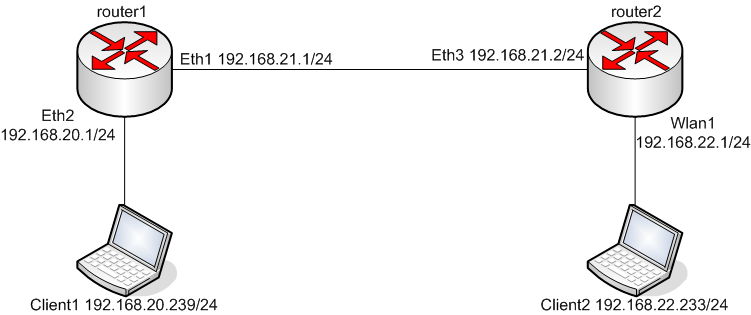
Static Routing Multiple Gateway – Mikrotik
Sebelumnya udah pernah ditulis di forum.chip.co.id
Berikut adalah how-to, tutorial untuk melakukan static routing ke dua gateway yang berbeda (multiple gateway), dengan menggunakan Mikrotik Router OS, dan contoh kasus sebuah warnet yang menggunakan koneksi ADSL untuk international dan koneksi wireless untuk IIX…
How to limit a user to a given amount of traffic?
Diambil dari http://forum.mikrotik.com/viewtopic.php?f=9&t=20420
:local sum; :local traf;
:set sum 0
/ip firewall rule forward {
:foreach i in [find] do={:incr sum}
:for i from=1 to=$sum  do={
:set traf [get [find comment=("user" . $i)]
bytes]
:set traf ($traf/1073741824)
:if ($traf>1) do={:log facility=System-Info \
message=("user" . $i ." exceeded 1Gb limit!")}
}
}
Script to save logs and send via email
Diambil dari forum.mikrotik.com
Script ini hanya berjalan di versi 3.x, di versi 2.9.x tidak berjalan, apalagi versi 2.9.27
Pastikan anda sudah mengisi server dan from di konfigurasi mikrotik.
/system script add name="LogDump" policy=ftp,reboot,read,write,policy,test,winbox,password,sniff source="
:local body
:foreach int in=[/log find ] do={
  :set body ("$body\r\n" . [/log get $int])
}
/tool e-mail send to="YOU@DOMAIN.COM" subject=([/system identity get name] . " Log " . [/system clock get date]) body=$body
/system logging action set memory memory-lines=1
/system logging action set memory memory-lines=100"
/system script add disabled=no interval=1d name="Run Log Dump" on-event=LogDump start-date=jan/01/1970 start-time=00:00:00
Monday, September 6, 2010
During some QoS tests on Linux I needed to measure the traffic of the system in realtime without being able to compile any new software on it. The system had already perl installed so I googled to find a script that could monitor in/out traffic of an interface. The first script I found was this: http://perlmonks.org/?node_id=635792
While it’s actually doing what it says, it only runs just once. I wanted the script to run for a period of time. So I changed it a bit.
Here’s the outcome:
I’ve changed it so that it’s:
a) running continuously until someone presses ctrl+c to stop it,
b) parsing the /proc/net/dev output instead of the ifconfig output. I think this is more efficient/fast than parsing the ifconfig output.
Sample output:
You can also download a version with comments that I made so that one can make the script run for X number of repetitions instead of running until someone stops it.
http://www.void.gr/kargig/blog/wp-content/iftraffic.pl
Source : http://www.void.gr/kargig/blog/2009/05/04/iftraffic-perl-script-to-measure-inout-traffic-in-realtime/
While it’s actually doing what it says, it only runs just once. I wanted the script to run for a period of time. So I changed it a bit.
Here’s the outcome:
#!/usr/bin/perl

my $dev=$ARGV[0];

sub get_measures {

my $data = `cat /proc/net/dev | grep "$dev" | head -n1`;

$data =~ /$dev\:(\d+)\D+\d+\D+\d+\D+\d+\D+\d+\D+\d+\D+\d+\D+\d+\D+(\d+)\D+/;

my $recv = int($1/1024);

my $sent= int($2/1024);

return ($recv,$sent);

}

my @m1 = get_measures;

while(1) {

sleep 1;

my @m2 = get_measures;

my @rates = ($m2[0] - $m1[0], $m2[1]-$m1[1]);

foreach ('received' , ' transmit') {

printf "$_ rate:%sKB",shift @rates;

}

print "\n";

@m1=@m2;

}
I’ve changed it so that it’s:
a) running continuously until someone presses ctrl+c to stop it,
b) parsing the /proc/net/dev output instead of the ifconfig output. I think this is more efficient/fast than parsing the ifconfig output.
Sample output:
$iftraffic.pl eth0I am sure that someone with more insight into perl than me can make it even more efficient.
received rate:1564KB transmit rate:71KB
received rate:1316KB transmit rate:44KB
received rate:1415KB transmit rate:48KB
received rate:1579KB transmit rate:76KB
You can also download a version with comments that I made so that one can make the script run for X number of repetitions instead of running until someone stops it.
http://www.void.gr/kargig/blog/wp-content/iftraffic.pl
Source : http://www.void.gr/kargig/blog/2009/05/04/iftraffic-perl-script-to-measure-inout-traffic-in-realtime/
Subscribe to:
Posts (Atom)