Showing posts with label layer 2. Show all posts

Monday, September 5, 2011

ARP Cache

The ARP cache is a table which stores mappings between Data Link Layer addresses and Network Layer addresses.
The Data Link Layer addresses are usually MAC addresses and the Network Layer addresses are most frequently IP addresses.
The ARP cache is stored in RAM by the Operating System.

Displaying the ARP cache

Under most versions of Unix and Microsoft Windows, the command `arp -a` will display the ARP cache.

Unix ARP Cache Example

$ arp -a
www.tech-faq.com (192.168.1.2) at 00:34:c4:45:73:21 on fxp0 permanent [ethernet]
fw.tech-faq.com (192.168.1.1) at 00:34:62:a1:c2:00 on fxp0 [ethernet]

ARP Cache ARP Cache

Microsoft Windows ARP Cache Example

C:>arp -a
Interface: 192.168.1.101 --- 0x80004
Internet Address Physical Address Type
192.168.1.1 00-0d-6d-bc-a8-6b dynamic
192.168.1.2 00-0e-1c-2b-e5-3c dynamic

Further Reading on the ARP Cache

To learn more about the ARP protocol, read What is ARP?
To learn how to clear the ARP cache, read How do I clear the ARP cache?

http://www.tech-faq.com/arp-cache.html

Sunday, August 7, 2011

MAC Overflow Attack

Address Resolution Protocol (ARP) Spoofing Attack

Layer 2 and security - protecting from attack


Before your access lists or firewall rules comes layer 2(L2). This is the Data link layer where your MAC addressing lives. Why do we need to protect L2…?
  • Man in the middle attacks happen via L2

  • Rogue DHCP on a single segment

  • DHCP server starvation attack

  • ARP attacks against your switches

  • Lets hit these guys one at a time:
    Man in the middle attack
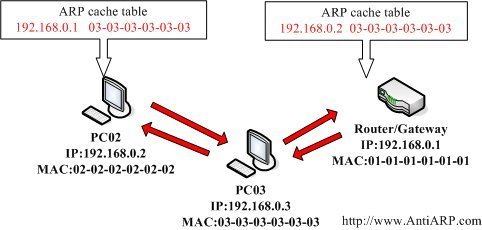
    What is a man in the middle attack? Here’s what wikipedia says about it. In a nutshell I tell the router that I am you, and I tell you that I am the router. What happens is that all your traffic passes through me…while I intercept everything possible about what you are doing. I wait for you to attempt a bank transaction and hand you a bunk site certificate and steal your monies :) I do this by sending gratuitous ARPs. These are unprovoked ARP announcements. I send ARPs over and over to the router saying I’m you. I then send you ARPs over and over saying that I am the router.

    What is DHCP Option 82?


    To put it simply, DHCP Option 82 is the "DHCP Relay Agent Information Option". Wasn't that easy?
    Option 82 was designed to allow a DHCP Relay Agent to insert circuit specific information into a request that is being forwarded to a DHCP server. Specifically the option works by setting two sub-options: Circuit ID and Remote ID.

    Friday, July 22, 2011

    Spanning Tree Protocol


    Memahami Bridging Loops dan Algoritma Spanning Tree Protocol
    Dalam membangun suatu infrastructure jaringan, kita membangun pondasi infrastructure logis (seperti layanan directory dari system windows server 2003, domain name system) dan juga infrastructure fisik (seperti domain controller, piranti jaringan seperti router dan switch). Switch adalah piranti jaringan yang paling banyak dipakai dalam suatu infrastructure jaringan fisik. Anda tahu bahwa switch dibuat berdasarkan konsep bridge.
    Bridge merupakan piranti murni yang bekerja pada layer Data Link pada model OSI, dimana merupakan cikal bakal daripada Switch LAN.
    Ada tiga jenis bridge:
    1. Tarnsparant bridge (untuk jaringan Ethernet dan Token Ring)
    2. Source-routing bridge (untuk jaringan Token Ring saja)
    3. Source-routing transparent bridge (untuk jaringan Token Ring saja)
    Karena kita hanya membahas jaringan Ethernet saja, maka hanya jenis transparent bridge saja yang kita akan concern. Suatu bridge disebut transparent jika kedua piranti pengirim dan penerima dalam suatu komunikasi dua piranti tidak menyadari adanya suatu bridge. Yang mereka tahu hanya lah bahwa keduanya berada pada segmen yang sama.
    Bagaimana transparent bridge bekerja?
    • Transparent bridges membangun database mengenai data dari piranti dan disegmen mana piranti tersebut berada dengan cara memeriksa sumber address dari paket yang datang. Untuk bridge yang baru dipasang database masih kosong. Begitu juga piranti jaringan yang baru dikonek ke bridge tidak ada dalam database.
    • Transparent bridge meneruskan paket berdasarkan aturan berikut:
      • Jika address tujuan tidak diketahui (tidak ada didatabase ), maka bridge meneruskan paket kesemua segmen.
      • Jika address tujuan diketahui dan ada di segmen yang sama, maka bridge membuang paket tersebut, jadi tidak dilewatkan ke segmen lainnya.
      • Jika address tujuan diketahui dan berada di segmen lain, maka bridge meneruskan paket kepada segmen yang tepat.
    • Transparent bridge meneruskan paket hanya jika kondisi berikut dipenuhi:
      • Frame berisi data pada layer bagian atas (data dari sub-layer LLC keatas)
      • Integritas frame telah diverifikasi (suatu CRC yang valid)
      • Frame tersebut tidak dialamatkan kepada bridge
    Bridging loops dan STA – Algoritma Spanning Tree
    Bridge menghubungkan dua segmen LAN, membentuk satu jaringan. Bridge, dengan namanya saja sudah mensiratkan arti sebuah jembatan, merupakan titik pertemuan antara dua segmen jaringan.
    Jika bridge ini tidak berfungsi, maka sudah pasti traffic antara kedua segmen jaringan tersebut menjadi tidak mungkin. Agar dua jaringan tadi bisa fault tolerance (artinya jika ada kerusakan maka harus ada backup yang menggantikan fungsi tersebut), maka setidaknya harus ada dua bridge untuk menghubungkan kedua jaringan.
    Spanning Tree Protocol - Bridging Loop
    Spanning Tree Protocol - Bridging Loop
    Pada gambar ini, kedua jaringan dihubungkan dua buah bridge yang bersifat fault tolerance, jika fungsi bridge yang beroperasi tidak berfungsi, atau gagal berfungsi, maka bridge satunya akan menggantikan fungsi bridge yang gagal fungsi tadi. Walaupun kedua bridge ini hidup, akan tetapi secara teori hanya satu saja yang berfungsi (misalnya bridge #1). Jika bridge # 1 ini tidak berfungsi, maka bridge # 2 akan menggantikan fungsinya.
    Spanning Tree Protocol - Broadcast Storm
    Spanning Tree Protocol - Broadcast Storm
    Kenapa hanya satu? Jika keduanya berfungsi, maka terjadi redundansi link (jalur) antara dua segmen jaringan tersebut. akibatnya sudah dipastikan bahwa paket antar dua jaringan tersebut berputar-putar melewati kedua bridge tadi tanpa henti sampai akhirnya mati sendiri …wong kecapekan. Kondisi ini disebut sebagai bridging loops atau bisa juga disebut dengan broadcast storm.
    Untuk mencegah terjadinya bridging loop, komisi standard 802.1d mendifinisikan standard yang disebut Spanning Tree Algoritm (STA), atau Spanning Tree Protocol (STP). Dengan protocol ini, satu bridge untuk setiap jalur (rute) di beri tugas sebagai designated bridge. Hanya designated bridge yang bisa meneruskan paket. Sementara redundansi bridge bertindak sebagai backup.
    Keuntungan dari spanning tree algoritma
    Spanning tree algoritma sangat penting dalam implementasi bridge pada jaringan anda. Keuntungan nya adalah sebagai berikut:
    • Mengeliminir bridging loops
    • Memberikan jalur redundansi antara dua piranti
    • Recovery secara automatis dari suatu perubahan topology atau kegagalan bridge
    • Mengidentifikasikan jalur optimal antara dua piranti jaringan
    Baaimana spanning tree bekerja?
    Spanning tree algoritma secara automatis menemukan topology jaringan, dan membentuk suatu jalur tunggal yang yang optimal melalui suatu bridge jaringan dengan menugasi fungsi-2 berikut pada setiap bridge. Fungsi bridge menentukan bagaimana bridge berfungsi dalam hubungannya dengan bridge lainnya, dan apakah bridge meneruskan traffic ke jaringan-2 lainnya atau tidak.
    Spanning Tree Protocol - Root Bridge
    Spanning Tree Protocol - Root Bridge
    1. Root bridge
    Root bridge merupakan master bridge atau controlling bridge. Root bridge secara periodik mem-broadcast message konfigurasi. Message ini digunakan untuk memilih rute dan re-konfigure fungsi-2 dari bridge-2 lainnya bila perlu. Hanya da satu root bridge per jaringan. Root bridge dipilih oleh administrator. Saat menentukan root bridge, pilih root bridge yang paling dekat dengan pusat jaringan secara fisik.
    2. Designated bridge
    Suatu designated bridge adalah bridge-2 lain yang berpartisipasi dalam meneruskan paket melalui jaringan. Mereka dipilih secara automatis dengan cara saling tukar paket konfigurasi bridge. Untuk mencegah terjadinya bridging loop, hanya ada satu designated bridge per segment jaringan
    3. Backup bridge
    Semua bridge redundansi dianggap sebagai backup bridge. Backup bridge mendengar traffic jaringan dan membangun database bridge. Akan tetapi mereka tidak meneruska paket. Backup bridge ini akan mengambil alih fungsi jika suatu root bridge atau designated bridge tidak berfungsi.
    Bridge mengirimkan paket khusus yang disebut Bridge Protocol Data Units (BPDU) keluar dari setiap port. BPDU ini dikirim dan diterima dari bridge lainnya digunakan untuk menentukan fungsi-2 bridge, melakukan verifikasi kalau bridge disekitarnya masih berfungsi, dan recovery jika terjadi perubahan topology jaringan.
    Perencanaan jaringan dengan bridge mengguanakan spanning tree protocol memerlukan perencanaan yang hati-2. Suatu konfigurasi yang optimal menuntut pada aturan-2 berikut ini:
    • Setiap bridge sharusnya mempunyai backup (yaitu jalur redundansi antara setiap segmen)
    • Packet-2 harus tidak boleh melewati lebih dari dua bridge antara segmen-2 jaringan
    • Packet-2 seharusnya tidak melewati lebih dari tiga bridge setelah terjadi perubahan topology.
    Spanning tree protocol (STP) adalah layanan yang memungkinkan LAN switches dikoneksikan secara redundansi dengan memberikan suatu mekanisme untuk mencegah terjadinya suatu bridging loops.
    Kebutuhan minimum yang berhubungan dengan STP adalah sebagai berikut:
    1. Versi standard STP adalah 802.1d dan harus di “enable” pada semua switch (walaupun by default switch adalah “enable” STP nya). STP tidak boleh di “disabled” disemua switches.
    2. Dokumentasi jaringan anda harus ada dan menunjukkan dengan jelas topology jaringan anda termasuk redundansi link yang mungkin ada
    3. Yang ini sangat direkomendasikan: bahwa port Switch yang dihubungkan ke pada komputer, printer, server, dan router (tetapi tidak ke switch, bridge atau hub) haruslah “STP port-fast enabled”. Port-fast juga sering disbut sebagai fast-start atau start-forwarding. Port-fast dapat digunakan untuk mempercepat transisi port host untuk antisipasi transisi lambat dari berbagai kondisi STP. Tanpa adanya port-fast “enable” kebanyakan koneksi akan mengalami time-out saat melakukan koneksi pertama kali. Telah diketemukan bahwa banyak koneksi Novell IPX dan DHCP mengalami time-out bahkan gagal jika tanpa port-fast “enable”.
    Jangan melakukan “enable” STP port-fast pada port koneksi antar switch karena akan menimbulkan bridging loop kepada jaringan. STP port-fast adalah fitur dari kebanyakan Switch yang versi baru (modern) dan biasanya tidak di “enable” by default.
    Kesimpulan: tanpa perencanaan Switch LAN dan STP tuning yang benar, masalah stabilitas LAN dan convergensi bisa saja terjadi didalam suatu jaringan multi-redundansi yang kompleks. Disable STP bisa menyebabkan bridging loop dan broadcast storm yang pada gilirannya menyebabkan jaringan anda menjadi pelan-pelan kayak ?????

    Tuesday, July 19, 2011

    MadMACs: MAC Address Spoofing And Host Name Randomizing App For Windows


    Description:

            I hope you enjoy this little MAC address and host name changer. When Glj12 told me about his host name randomizer, I told him about my desire to make a MAC address randomizer. We decided it would be cool to rap them both together, so I ported parts of his VBScript to Autoit3.
            MadMACs was designed with the privacy paranoid in mind. The two main things a DHCP server records when you get an IP from it is your host name and the MAC address of the network card you are connecting from. This is identifying information that not all users want to leave behind. MadMACs allows you to randomize this information after it runs and reboots.

            If you have the source It can be compiled with Autoit3 from:

                http://www.autoitscript.com 

            I chose Autoit3 because it's free and very flexible. To find the latest version of MadMACs and its documentation visit:

                http://irongeek.com 

    and look in the apps section.

    Configuring MACs to Spoof and Randomize:

            The first thing you should do is copy MadMACs.exe to what ever directory you plan to have it run from. If mac-config.txt does not exist in the same directory as the binary a wizard will come up and guide you through configuring which adapters get their MAC addresses randomized. The Wizard will ask you what prefix to use on the MAC address, keep the default 00 unless you want to use a specific vendor's MAC address range. For a list of vendor specific prefixes see:

                http://standards.ieee.org/regauth/oui/oui.txt

            This wizard also lets you set a registry entry to automatically run the randomizer on start up. There are two possible command line parameters:

    config
            Brings up the setup wizard
    remove
            Removes all of the registry entries.
            If you run MadMAX without parameters you are asked "Do you wish to remove MadMACs from startup and clear the registry? Click No to configure MadMACs instead or Cancel to forget the whole matter." Make the logical choice to get the desired outcome.
            If you want MadMACs to randomly set your host name make a text file called dic.txt in the same directory as the binary. This text file's format is one word after another separated by line feeds. If you are feeling lazy just rename the file "sample dic.txt" that comes with MadMACs to "dic.txt". MadMACs will randomly select a word from dic.txt and make that your host name. You may not want to use the host name randomizing functionality if you need to reach the host with the same name every time.

            Most of the setting don't take effect until the computer reboots (sort of :) there are exceptions, like if you disable and enable the adapter). Basically, the current session randomizes the next session. If you have questions about the code, ask on the Binrev forums so I don't have to answer the same questions over and over again in email.

            I take no liability for the misuse of this code. If you mess up your system or network with a bad MAC address or host name it's your fault. Use at your own risk. I've only tested it in Windows XP, and Vista so far. Consider this code GPLed.

    Side Notes:
            A patron of my website pointed out that MadMACs, and other similar tools, seem to have a problem randomizing the MAC address under Windows Vista if you are using the Intel Wireless WiFi Link 4965AGN chipset. It will work with the 4965AGN  if you randomize only the last two digits, and start it with the prefix 1234567890. It will also let you set the whole MAC address to DEADBEEFCAFE, or even let you randomize all 12 hex digits. However, if you take the default prefix of 00, MadMACs will make a random address up and put it in the NetworkAddress registry value, but the 4965AGN chipset drivers will not honor it. If anyone knows why, please contact me.

            For more information on how MAC addresses work read my article here:

                http://www.irongeek.com/i.php?page=security/changemac

            Thanks to Chronos and the others from BinRev for helping me with the name.

                http://www.binrev.com/forums/index.php?showtopic=25548 

            Thanks to the Ispell project for the sample word list. If you want a more polished Windows MAC Spoofing tool see:

                http://www.gorlani.com/publicprj/macmakeup/macmakeup.asp

            It's great, the only reason I wrote MadMACs was to better automate the randomization of MAC addresses and to add in the host name changing functionality.

            If you want a simular tool to this for Linux look at:
                http://www.hak5.org/wiki/MAC_Randomizer
    Change Log:
    Ver. 1.2: Qwasty let me know that if host name randomization is used with MacMACs, and the host name is over 15 characters (or has certain bad illegal characters) it can cause all sorts of lsass.exe errors on boot up. To fix this, I've updated the code to do some sanity checks on the possible hostnames given to it in dic.txt. Hopefully this fixes the problem. I also compiled it with the newerAutoit3 v3.2.12.1.

    Ver. 1.1: Added better Vista support. It's compiled with Autoit3 v3.2.1.14 (beta), so older versions may not compile the script right. When you login to Vista you will still have to either tell it to run via the error message you see in the system tray about start up apps, or just turn off User Account Control (UAC).

    http://www.irongeek.com/i.php?page=security/madmacs-mac-spoofer

    Monday, July 18, 2011

    Flood network with random MAC addresses with macof tool


    Macof is a member of the Dsniff suit toolset and mainly used to flood the switch on a local network with MAC addressess . The reason for this is that the switch regulates the flow of data between its ports. It actively monitors (cache)  the MAC address on each port, which helps it pass data only to its intended target. This is the main difference between a switch and passive hub. A passive hub has no mapping, and thus broadcasts line data to every port on the device. The data is typically rejected by all network cards, except the one it was intended for. However, in a hubbed network, sniffing data is very easy to accomplish by placing a network card into promiscuous mode. This allows that device to simply collect all the data passing through a hubbed network. While this is nice for a hacker, most networks use switches, which inherently restrict this activity.
    Dsniffs “macof” generates random MAC addresses exhausting the switch’s memory. It is capable of generating 155,000 MAC entries on a switch per minute. Some switches than revert to acting like a hub.
    The following question then arises: What happens if the switch is asked to process a constant stream of MAC addresses? In certain circumstances and on certain switches, this will cause the switch to go into a fail-safe mode, in which it basically turns into a hub. In other words, by overloading the switch, a hacker could have access to all the data passing through the switch! One tool for doing this is called “macof” To use “macof”, you will need to install the ‘dnsiff’ suite .
    macof [-i interface] [-s src] [-d dst] [-e tha] [-x sport] [-y dport] [-n times]
    -i interfaceSpecify the interface to send on.
    -s srcSpecify source IP address.
    -d dstSpecify destination IP address.
    -e thaSpecify target hardware address.
    -x sportSpecify TCP source port.
    -y dportSpecify TCP destination port.
    -n timesSpecify the number of packets to send.
    macof produces a lot of traffic on the network , it is a good practice to define a large number for the mac-flood  attack  with the ” -n xxxx” option ( if no option is specified –> infinite flooding) . Some switches regain their initial state after some time interval , this can be bypassed by setting macof in ” burst mode operation ” :
    # while  [ 1 ]  ; do macof -d 192.168.1.1 -n 100000 ; sleep 50 ; done