Showing posts with label wireless. Show all posts

Sunday, July 24, 2011

Bridge vs Bridge WDS


Terbiasa dengan Routerboard yang dimana bridgenya udah langsung transparent di Layer 2, ini ketemu UBNT Nano Bridge M5 ternyata udah beda…ada 2 fungsi yaitu Bridge dan Bridge WDS
Letak perbedaan ketemu setelah melakukan static route, problemnya bila kita gunakan mode Access Point di sisi Master dan Station di sisi Slave network yg diroute tadi tidak bisa tercapai, problem tsb dikarenakan layer 2 tidak sepenuhnya transparent bridge.
Berikut adalah contoh konfigurasi untuk transparent bridge Layer 2
Master : Access Point WDS

Slave : Station WDS

Problem Solved


http://tribudi.wordpress.com/2010/05/16/bridge-vs-bridge-wds/

Tuesday, July 19, 2011

airpwn - bringing goatse (and friends) to Defcon 12!

**WARNING** In case you can't figure it out, HERE THERE BE GOATSES!!
Images from Dave's camera
Movies from Dave's camera
Images from my phone
At Defcon 12 this year my cow-orkers and I brought along a little piece of code called "airpwn." Airpwn is a platform for injection of application layer data on an 802.11b network. Although the potential for evil is very high with this tool, we decided to demonstrate it (and give it its first real field trial) on something nasty, but harmless (compared to say, wiping your hard-drive)

Over the course of defcon, we fielded 7 different airpwn configurations to see how well it worked, and of course to watch as 31337 h4x0rz got goatse up in their mug. The configurations were:

HTTP goatse, 100% of the screen
HTTP goatse replacing all images
HTTP goatse as the page background via CSS
HTTP tubgirl replacing all images
HTTP "owned" graphic, replacing all images (eventually I felt bad about all the ass pictures)
HTTP javascript alert boxes, letting people know just how pwned they were
FTP banners (while this worked, nobody pays attention to FTP banners so we abandoned this quickly)
How does it work?

airpwn requires two 802.11b interfaces, one for listening, and another for injecting. It uses a config file with multiple config sections to respond to specific data packets with arbitrary content. For example, in the HTML goatse example, we look for any TCP data packets starting with "GET" or "POST" and respond with a valid server response including a reference to the canonical goatse image. Here's the configuration file used for this mode:

begin goatse_html
match ^(GET|POST)
ignore ^GET [^ ?]+\.(jpg|jpeg|gif|png|tif|tiff)
response content/goatse_html

and here is the content that we return when the match is triggered:

OPEN YOUR MIND -- TO
THE ANUS!!


Each of the 7 modes mentioned previously varied in the configuration and content returned. In each case the poor user of the web browser was left feeling disgusted, afraid and/or confused. While I was busy operating airpwn at the laptop, my accomplices wandered the show-floor taking pictures and the occasional video of our victims. Links to our victims are at the top of the page.
In all honesty, the reaction to airpwn wasn't exactly what I had expected. When I was writing the code, I imagined that the second I turned airpwn on we'd hear immediate groans of disgust radiating out at the speed of light. In practice, airpwn's effect was simultaneously more private, and more full of personal drama. First off, the full-screen goatse seemed to be too powerful. The second it flashed on the screen, the savvy user would have the browser closed already. This made it incredibly difficult to actually catch the victims on film. Based on the logs generated by airpwn we would be hitting multiple people per second, but finding someone with goatse up on their screen was still a bit of a challenege.. Once we did find a victim, the results were pretty hillarious.. I had tears rolling down my cheeks on multiple occasions. The typical goatse reaction went something like this:

Open browser, see goatse, jump backwards a little
quickly close browser, take a breath
open browser, see goatse, close browser (faster this time)
scratch head, quit browser process, re-launch browser
see page indicating that goatse will load soon (page header, etc.) immediately close browser.
open up browser preferences, click all the tabs, look for the "no goatse" checkbox
clear the browser cache
open browser, see goatse, close browser
open network preferences, click on all the tabs, look for the "no goatse" checkbox.
disconnect from network, re-associate
open browser, see goatse, close browser
At this point, the less l33t people would generally give up and either 1) do something else or 2) look deep into goatse's anus with a 10-yard stare.. The more l33t victims would launch ethereal and try to figure out what was going on.. Eventually they would mumble something about "rogue APs" (WRONG!) or ARP poisoning (WRONG!) or DNS poisoning (WRONG!) and do something else..
After a few hours, it quickly became apparent that the image replacement mode was the only mode that would sustainable for long periods of time. The full-screen goatse amounted to a complete DoS of HTTP, which was just plain rude. The javascript injection (with dialog boxes talking about the victim being pwned) was by far the most distruptive. Most people (quite sanely) immediately turned off their laptops or whipped out ethereal in full COUNTERHACK mode. The goatse image mode was disruptive enough to be fully fucking hillarious, yet still left HTTP enough alone to be usable. I guess image-maps were the only things we truly broke with that mode (hint: click the anus!)

Overall, airpwn was just about the only reason why defcon was amusing this year.. Without airpwn I think I would have been mostly asleep and would have just IRCed the entire time.. If you want to play with airpwn yourself, an early alpha has been posted to sourceforge..

http://www.evilscheme.org/defcon/

Monday, July 18, 2011

Honeypot Concepts

People often wonder what honeypots can be used for. Here are some examples on how Honeyd and honeypots in general can be used to improve security or for network measurements.

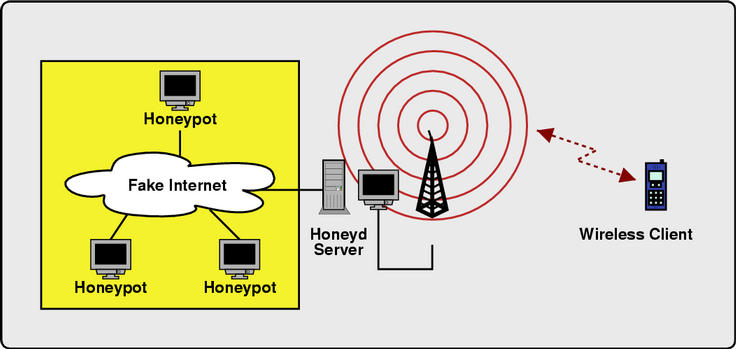
Wireless Honeypot

Setup an isolated machine running Honeyd:
  • Run an access point. This can be done with Linux or *BSD by putting a wireless card into hostap mode and using it to create a wireless network.
  • Configure and run a DHCP server. You need to determine which network the DHCP server should hand addresses out for, e.g. 192.168.0.0/16. The router and name server records need to to point to IP addresses simulate by Honeyd.
  • Instrument Honeyd to provide fake Internet topology. This can be achieved by configuring a virtual network topology for the whole IP address space except for the address range that is served by DHCP. Make sure that you have a name server running that resolves names. This can be done without the laptop being connected to the Internet itself.
wireless topology
Diagram showing wireless honeypot configuration.
Monitor for unauthorized access:
  • Run an intrusion detection system or monitor services for abuse or interesting activity.
  • Set up spam traps and open proxies to see if spammers use unsecured wireless access points to send spam.

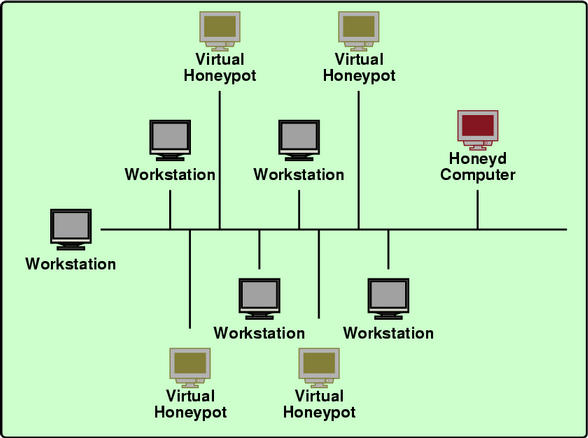
Integrated Honeypots

Distract adversaries by mixing virtual honeypots into your production network:
  • Use either Arpd or a recent version of Honeyd with ethernet-level simulation to redirect traffic for unused IP addresses. Ethernet-level simulation can be turned on by using:set template ethernet "00:aa:bb:cc:dd:ee"
  • Set up Honeyd to simulate virtual honeypots for the redirected IP addresses.
Monitor for unauthorized access:
  • Run an intrusion detection system or monitor services for abuse or interesting activity.
  • Detect compormised machines by watching who probes the honeypots.
Just by running honeypots, you make live harder for adversaries because they might waste their resources by breaking into the honeypots. Honeypots can also serve as a warning sign for a highly monitored network.
integrated honeypots
Diagram showing an integrated honeypot configuration.

If you are missing a concept, please let me know.


http://www.honeyd.org/concepts.php

Tuesday, September 14, 2010

Determining signal strength

The wireless standard 802.11b operates in the 2.4-2.485GHz (gigahertz) radio frequency (RF) band; RF is measured in decibels (dB). Wireless cards often come with client software that displays signal strength in dB or dBm (a variant of dB that provides an exact correlation to the power of the radio signal in watts).

Note: The minimum power sensitivity on most 802.11b clients is -96dBm (very low). If your software displays "Signal/Noise" or "SNR" in dBm, you can convert this to dB by subtracting the minimum power sensitivity, -96dBm, from the number displayed as "SNR" or "Signal/Noise". For example, if the Signal/Noise is -47dBm, you would convert this to dB as follows:
-47dBm - (-96dBm) = 49dB

If your wireless card software is indicating that the signal-to-noise ratio (SNR) is greater than 10dB, you are getting the maximum available bandwidth, or 11Mbps (megabits per second). An SNR higher than 10dB won't increase the amount of bandwidth beyond this maximum (in the example above, with an SNR of 49dB, the bandwidth is still 11Mbps, the maximum available rate). When the SNR drops below 10dB, however, the maximum data rate drops:
SNR
Maximum data rate
8dB
5.5Mbps
6dB
2Mbps
4dB
1Mbps
Even though the maximum data rate goes down, the connection will still be maintained as long as you have an SNR of 4dB or greater.

Possible problems

Other factors can affect the quality of your wireless connection. The list below is incomplete, but it may offer some explanation for poor performance that occurs even when the signal strength is good:
  • Multipath: In general, an RF signal grows wider as it is transmitted farther. As it spreads, the RF signal will meet objects in its path that will interfere with the signal in various ways (e.g., by reflecting it). When the signal is reflected by an object (e.g., a metal object) while moving toward a receiver, multiple wave fronts are created, one for each reflection point. This can result in a large number of waves, depending on how many reflecting surfaces the original signal encounters. Many of these reflected waves are still moving toward the receiver, creating a condition known as multipath. As the number of reflective surfaces increases, the signal deteriorates.
  • Near/far: Near/far is a problem that can happen when multiple wireless users have devices that are very near an access point, much closer than a user who's on the radio signal boundary. The farthest device cannot be heard over the traffic from the devices closer to the access point. The only solution is to move the more distant device closer to the access point.
  • Hidden node: When you turn on an 802.11b-capable laptop or handheld device, it immediately scans the airwaves for access points. It quickly evaluates the signal  strength of the available access points, and the number of users per  access point. Based on this, the device will choose the access point with  the strongest RF signal and the fewest users. In hidden node situations, at least one client (node) is unable to "hear" one or more of  the other clients connected to the same access point. Usually this is because of some physical obstruction between it and other users. As a result, there can be problems in the way the clients share the available bandwidth, causing data "collisions", or bit errors. When a bit error occurs, the clients need to re-transmit the data. These collisions can result in significantly degraded data transmission rates in the      wireless network.
  • Dynamic Rate Shifting (DRS): The terms Adaptive (or Automatic) Rate Selection (ARS) and Dynamic Rate Shifting (DRS) denote how bandwidth is adjusted dynamically by wireless clients. This adjustment in speed occurs as distance increases between the  client and the access point (or possibly if interference increases). As  the distance grows greater, the signal strength will decrease to a point  where the current data rate cannot be maintained. As the signal strength drops, the client will drop its data rate to the next lower specified data rate, for example, from 11Mbps to 5.5Mbps, or from 2Mbps to 1Mbps.

Throughput

Throughput is a measure of the speed of your wireless connection. Defined as the amount of data transmitted in a given time period, throughput is based on many factors. Three important factors are described below:
  • Interference from another radio frequency source: IU uses the 802.11b wireless standard, which operates in a frequency range that is unlicensed, meaning the Federal Communications Commission allows anyone to use it. Unfortunately for 802.11b users, microwave ovens and 2.4GHz cordless phones operate in the same frequency band. The radio signal emanating from such devices can severely degrade or completely destroy an 802.11b signal.
  • Security: 802.11b networks, if not secure, are susceptible to hacking and data theft by unauthorized users. Any sensible network owner will use some form of security. This adds more overhead to the wireless data packets; this overhead (bits of data) uses valuable bandwidth, but is absolutely necessary. Although 802.11b allows for 11Mbps maximum throughput, a user will typically get only about 5.5-6Mbps of data. IU uses a virtual private network (VPN) for encryption and authentication. Another method is wired equivalent privacy (WEP), but it is much less secure than VPN.
  • Distance: Greater distances between the transmitter (access point) and receiver (client) will cause the throughput to decrease because of an increase in the number of errors (bit error rate). 802.11b recognizes these bit errors and requires that the bits be retransmitted. 802.11b is configured to make discrete jumps to specified data rates (11, 5.5, 2, and 1Mbps). If 11Mbps cannot be maintained because of bit errors and degrading signal strength, then the device will drop to 5.5Mbps, then to 2Mbps, and then to 1Mbps, with eventual loss of the connection. Remember, too, that because of overhead, you'll get only about half of the available bandwidth.

What is Signal to Noise Ratio ?

Signal to noise ratio is a specification that measures the level of the audio signal compared to the level of noise present in the signal. Signal to noise ratio specifications are common in many components, including amplifiers, phonograph players, CD/DVD players, tape decks and others. Noise is described as hiss, as in tape deck, or simply general electronic background noise found in all components.
How is it Expressed?

As the name suggests, signal to noise ratio is a comparison or ratio of the amount of signal to the amount of noise and is expressed in decibels. Signal to noise ratio is abbreviated S/N Ratio and higher numbers mean a better specification. A component with a signal to noise ratio of 100dB means that the level of the audio signal is 100dB higher than the level of the noise and is a better specification than a component with a S/N ratio of 90dB.
Why is it Important?

Unfortunately, all components add some level of noise to an audio signal but it should be kept as low as possible. Analog components, such as amplifiers, tape decks and phonograph players generally have a lower signal to noise ratio than digital components, such as CD and DVD players but the goal is still to keep noise as low as possible. As an example, a signal to noise ratio for tape deck or phonograph player is typically about 60dB-70dB, while it is common for a CD player to have a S/N Ratio of 100dB or higher. S/N Ratio is important, but should not be used as the only specification to measure the sound quality of a component.

Courtesy : http://stereos.about.com/od/faqs/f/SNratio.htm

Monday, September 6, 2010

How to cloak hidden SSID

There are several ways to view hidden ssid (cloaks hidden ssid);
- Waiting for client to connect to the AP to perform authentication
- Deauthentication attack
- Brute Force SSID

# Waiting for client to connect to the AP to perform authentication:
take a long time

# Deauthentication attack:
To be faster, usually my wifi channel set to AP "destination" that will be in his peep ssid.

- Airmon-ng start [interface] [channel]
- Airodump [interface] [filename] [channel]
- Aireplay-ng -0 1-a XX: XX: XX: XX: XX: XX-c YY: YY: YY: YY: YY: YY [interface]

Description;
-0 1 = attack mode
-A XX: XX: XX: XX: XX: XX = MAC address of AP
C-YY: YY: YY: YY: YY: YY = Destination MAC address
Interface = ath0

Then see the results of capture using aireplay-ng airodump. Within seconds (emboh blonde seconds .. ora tau itung not ...:) ... .. appeared ssid "goal".

For more details, please refer to the manual aireplay-ng - help

SSID # Brute Force
Some attackers use tools such as MDK3.

SSID_jack was able to make cloaks hidden ssid.

Closing:
Do not do it on the others are owned by the network.

Link :
remote-exploit.com
securityfocus.com
Wi-foo, Andrew A. Vladimirov, Konstantin V. Gavrilenko, Andrei A. Mikhailovsky

Courtesy : http://adekrina.blogspot.com/2008/08/cloak-hidden-ssid.html