Sunday, March 27, 2011

Helix Fixed-point HE-AAC (aacPlus) decoder

The Helix Fixed-point HE-AAC decoder provides an optimized 32-bit fixed-point implementation, which will be dual-licensed under RCSL/RPSL. No extra copyright license is required beyond the standard Helix license terms, although patent licenses are not included and must be acquired from the appropriate AAC licensors.

The Helix AAC decoder is highly optimized for ARM processors and meets or exceeds the performance of other commercial implementations. It also features one of the first widely available fixed-point implementations of SBR.

Key Features

  • MPEG-2 and MPEG-4 low complexity decoding (intensity stereo, MS, TNS, PNS)
  • Spectral band replication (SBR), high-quality mode
  • Mono, stereo, and multichannel modes
  • ADTS, ADIF, and raw data block decoding
  • MP4, RM, and other file formats supported via Helix client

Technical Specifications

Average CPU Usage

1. MPEG4-LC AAC (SBR not used)


Sample Rate
Channels
Bit Rate
Processor Model (1)
ARM9TDMI-REV2
ARM9E
StrongARM1 (uncached)
XScale (cached)
22 KHz
1
64 Kbps
7 / 9 MHz
5 / 7 MHz
6 / 8 MHz
6 / 8 MHz
44.1 KHz 1
96 Kbps 11 / 13 MHz
9 / 11 MHz
9 / 11 MHz
10 / 12 MHz
44.1 KHz 2
128 Kbps 19 / 23 MHz
17 / 21 MHz
17 / 20 MHz
18 / 21 MHz
44.1 KHz
2
320 Kbps
23 / 30 MHz
21 / 28 MHz
21 / 27 MHz
22 / 28 MHz

2. MPEG4-LC HE-AAC (SBR enabled, "high quality" mode)


Sample Rate
Channels
Bit Rate
Processor Model (1)
ARM9TDMI-REV2
ARM9E
StrongARM1 (uncached)
XScale (cached)
22 kHz base/44 kHz output
1
48 Kbps
32 / 34 MHz
27 / 29 MHz
27 / 29 MHz
28 / 30 MHz
22 kHz base/44 kHz output
2
64 Kbps
58 / 60 MHz
49 / 52 MHz
49 / 52 MHz
51 / 53 MHz

(1) Tested with ARMulator, simulated zero-wait-state memory

Notes:

  • Compiled using ARM ADS 1.2
  • Tested with ARMulator, zero-wait state memory
  • Results are average CPU usage, typical content
  • first MHz value is when TNS is off, second value is when TNS is on

Memory Usage

1. MPEG4-LC AAC (SBR not used)
  • ROM (const globals) = 27128
  • RAM (heap, max 2 channels) = 20656
  • Code size - x86 (MSVC++ 6.0) = 22654
  • Code size - ARM (ADS ARM9TDMI) = 20120
  • Additional RAM required per channel = 4104
2. MPEG4-LC HE-AAC (SBR enabled, "high quality" mode)
  • ROM (const globals) = 37580
  • RAM (heap, max 2 channels) = 79580
  • Code size - x86 (MSVC++ 6.0) = 47822
  • Code size - ARM (ADS ARM9TDMI) = 41764
  • Additional RAM required per channel = 17198

Notes:

  • Memory usage constant for all sample rates, bit rates
  • Does not include input buffer (encoded data) or output buffer (PCM)
  • There is no zero-init or read-write global data
  • All values are in bytes


Frequently Asked Questions

What features are currently not supported in the aacPlus decoder?

  • main or SSR profile, LTP
  • coupling channel elements (CCE)
  • 960/1920-sample frame size
  • low-power mode SBR decoding
  • downsampled (single-rate) SBR decoding

Where is the code in CVS?

  • See the Helix Datatype project page: http://datatype.helixcommunity.org
    The CVS root is /cvsroot/datatype, and the module name (path) is aac/codec/fixpt/decoder

Where does the build system put the code in my local source tree?

  • datatype/aac/codec/fixpt
How do I build the fixed-point AAC implementation through the "ribosome" build system?
  • In the build menu, use one of the following bif files: helix.bif (HEAD) or hxclient_1_5_0_cayenne.bif
  • Select the target "datatype_aac_codec"
  • Make sure the define "HELIX_CONFIG_FIXEDPOINT", is either in the profile or config (cf) file that you are currently using.
=======================================

Build System Menu
-> Current Directory: D:\client_150_cayenne
[0] Set BIF branch (hxclient_1_5_0_cayenne)
[1] Set Target(s) (datatype_aac_codec)
=======================================

How do I play .mp4/.3gp streams that contain AAC-encoded streams?

  • In the build menu, use the same bif as you have used above
  • Select the target "splay". This builds a command-line player through which you can play .mp4/.3gp streams
  • For instructions to check out source, go to Quickstart Guide
=======================================

Build System Menu
-> Current Directory: D:\client_150_cayenne
[0] Set BIF branch (hxclient_1_5_0_cayenne)
[1] Set Target(s) (splay)
=======================================

Where do developers go to acquire their aacPlus patent license?

Courtesy : 

ToS to DSCP mapping

ToS dec ToS hex ToS bin ToS Prec. (bin) ToS Prec. (dec) ToS Delay Flag ToS Throgh-
put Flag
ToS Relia-
bility FLag
DSCP bin DSCP hex DSCP dec DSCP Class
0 0×00 00000000 000 0 0 0 0 000000 0×00 0 none
32 0×20 00100000 001 1 0 0 0 001000 0×08 8 cs1
40 0×28 00101000 001 1 0 1 0 001010 0x0A 10 af11
48 0×30 00110000 001 1 1 0 0 001100 0x0C 12 af12
56 0×38 00111000 001 1 1 1 0 001110 0x0E 14 af13
64 0×40 01000000 010 2 0 0 0 010000 0×10 16 cs2
72 0×48 01001000 010 2 0 1 0 010010 0×12 18 af21
80 0×50 01010000 010 2 1 0 0 010100 0×14 20 af22
88 0×58 01011000 010 2 1 1 0 010110 0×16 22 af23
96 0×60 01100000 011 3 0 0 0 011000 0×18 24 cs3
104 0×68 01101000 011 3 0 1 0 011010 0x1A 26 af31
112 0×70 01110000 011 3 1 0 0 011100 0x1C 28 af32
120 0×78 01111000 011 3 1 1 0 011110 0x1E 30 af33
128 0×80 10000000 100 4 0 0 0 100000 0×20 32 cs4
136 0×88 10001000 100 4 0 1 0 100010 0×22 34 af41
144 0×90 10010000 100 4 1 0 0 100100 0×34 36 af42
152 0×98 10011000 100 4 1 1 0 100110 0×26 38 af43
160 0xA0 10100000 101 5 0 0 0 101000 0×28 40 cs5
184 0xB8 10111000 101 5 1 1 0 101110 0x2E 46 ef
192 0xC0 11000000 110 6 0 0 0 110000 0×30 48 cs6
224 0xE0 11100000 111 7 0 0 0 111000 0×38 56 cs7

Courtesy : http://blog.webdir.bg/tos-to-dscp-mapping/

Network latency experiments

Recently a series of blog posts by Jim Gettys has started a lot of interesting discussions and research around the Bufferbloat problem. Bufferbloat is the term Gettys’ coined to describe huge packet buffers in network equipment which have been added through ignorance or a misguided attempt to avoid packet loss. These oversized buffers have the affect of greatly increasing latency when the network is under load.
If you’ve ever tried to use an application which requires low latency, such as VoIP or a SSH terminal at the same time as a large data transfer and experienced high latency then you have likely experienced Bufferbloat. What I find really interesting about this problem is that it is so ubiquitous that most people think this is how it is supposed to work.
I’m not going to repeat all of the details of the Bufferbloat problem here (see bufferbloat.net) but note that Bufferbloat occurs at may different places in the network. It is present within network interface device drivers, software interfaces, modems and routers.
For many the first instinct of how to respond to Bufferbloat is add traffic classification, which is often referred to simply as QoS. While this can also be a useful tool on top of the real solution it does not solve the problem. The only way to solve Bufferbloat is a combination of properly sizing the buffers and Active Queue Management (AQM).
As it turns out I’ve been mitigating the effects of Bufferbloat (to great benefit) on my home Internet connection for some time. This has been accomplished through traffic shaping, traffic classification and using sane queue lengths with Linux’s queuing disciplines. I confess to not understanding, until the recent activity, that interface queues and driver internal queues are also a big part of the latency problem. I’ve since updated my network configuration to take this into account.
In the remainder of this post I will show the effects that a few different queuing configurations have on network latency. The results will be presented using a little utility I developed called Ping-exp. The name is a bit lame but Ping-exp has made it a lot easier for me to compare the results of different network traffic configurations.

My Home Network

The figure below outlines what my home network looks like. It’s pretty standard except for the addition of the Linux server (Dest2) which lives at my local ISP. By tunneling traffic between Dest2 and my home router I can control the downstream traffic in a way not available to most Internet users.
Home network diagram
My Internet connection is PPPoE based and a operates at a the modest speed of ~4Mbps download and ~768Kbps upload.

Experimental Design

In each of the experiments below Ping-exp was run on both hosts A and B, pinging both Dest1 and Dest2, five times per second, with a total of 400 pings (80 seconds).
./ping-exp.py -w test.data -t 'dest1,<IP1>,0' -t 'dest2,<IP2>,0' -i .2 -c 400
[Replace <IP1> and <IP2> if cutting and pasting the above]
In the results below I only show data from HostA because the results are very similar on HostB. I had originally planned to perform some experiments which involved per-host fairness but that will have to wait for another time.
Each network configuration was tested under the four network load scenarios outlined in the table below. In each case there was a short interval of approximately one minute between starting the load and running Ping-exp. All load was generated from HostA.
Load Description
Empty No traffic
Upload 2 TCP uploads to C
Download 3 TCP downloads from C
Both 2 TCP uploads to C and 3 TCP downloads from C

Experiment 1: Defaults

In this experiment all device queues and traffic management configurations were unmodified from the Linux defaults.

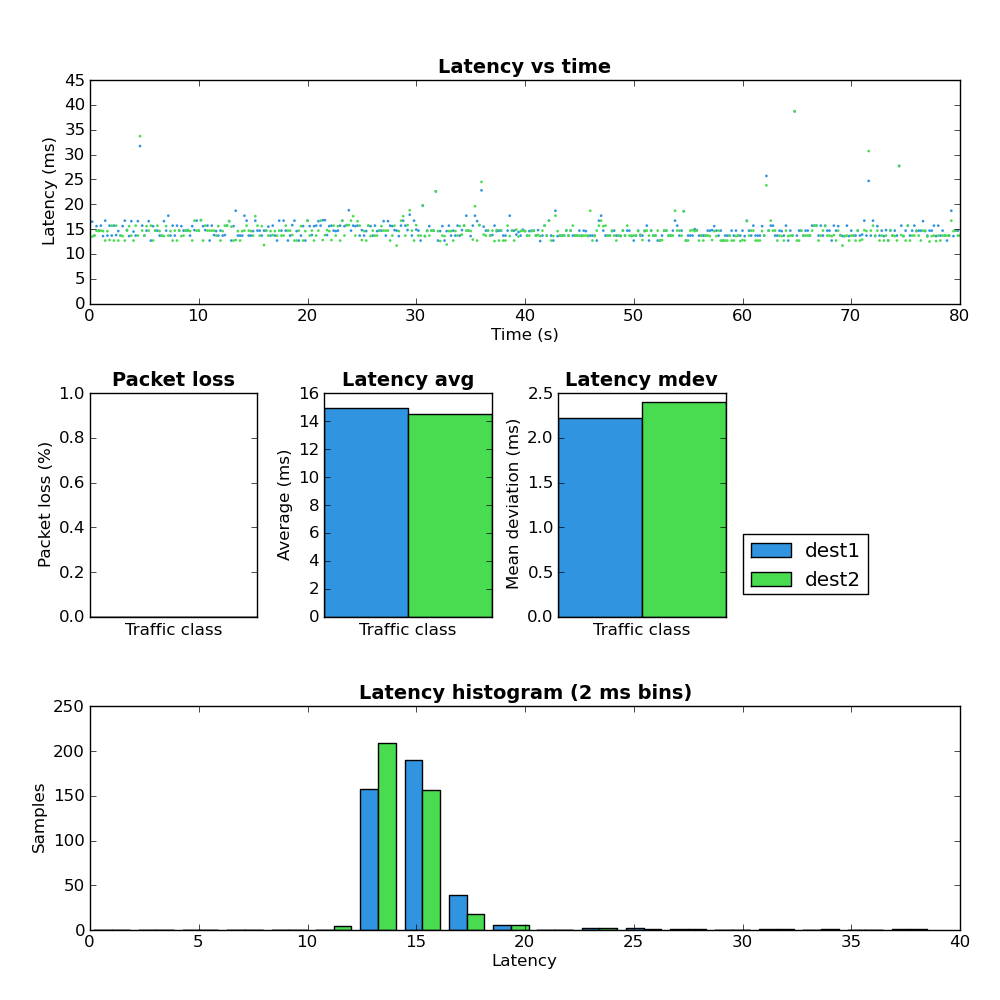
Network Load: Empty
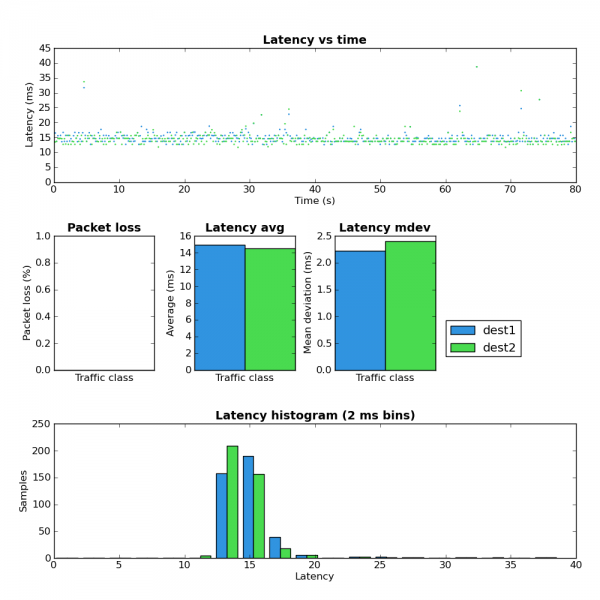
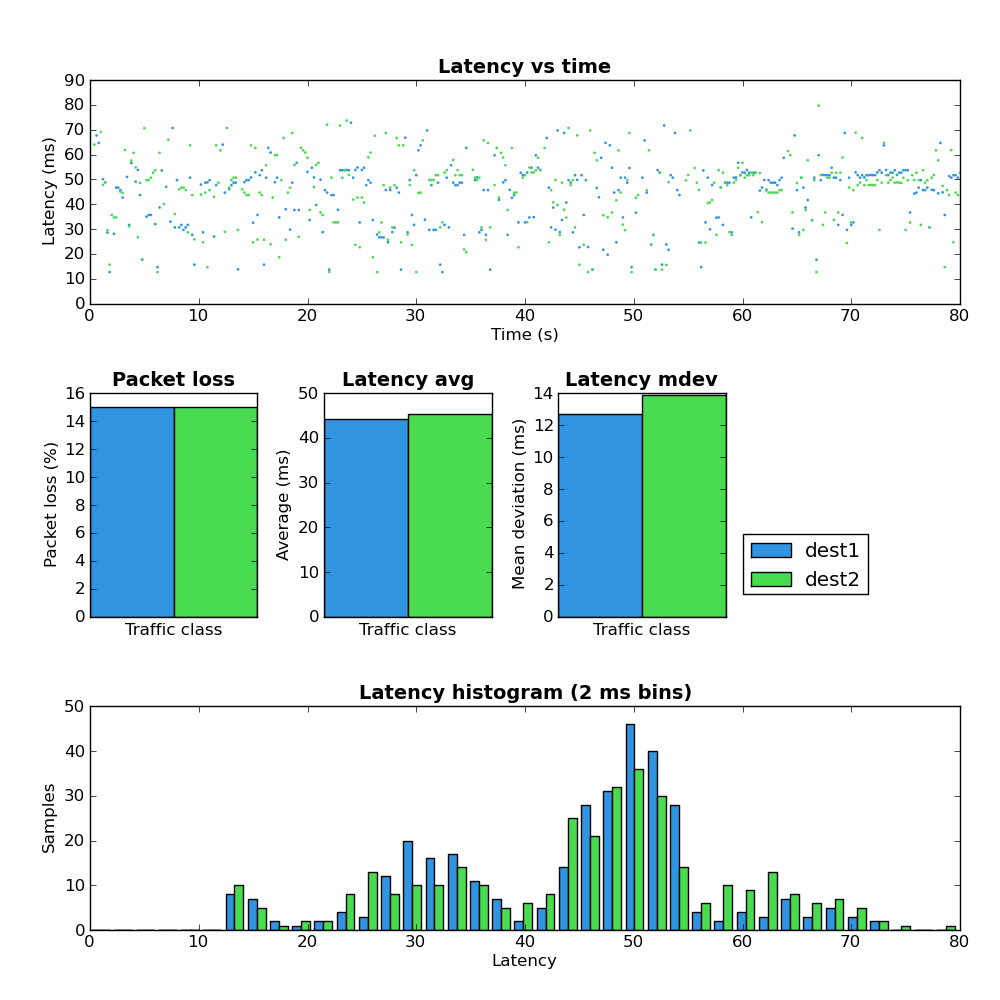
Figure 1: Host A - defaults - empty
Figure 1 provides a baseline for the network with no traffic.

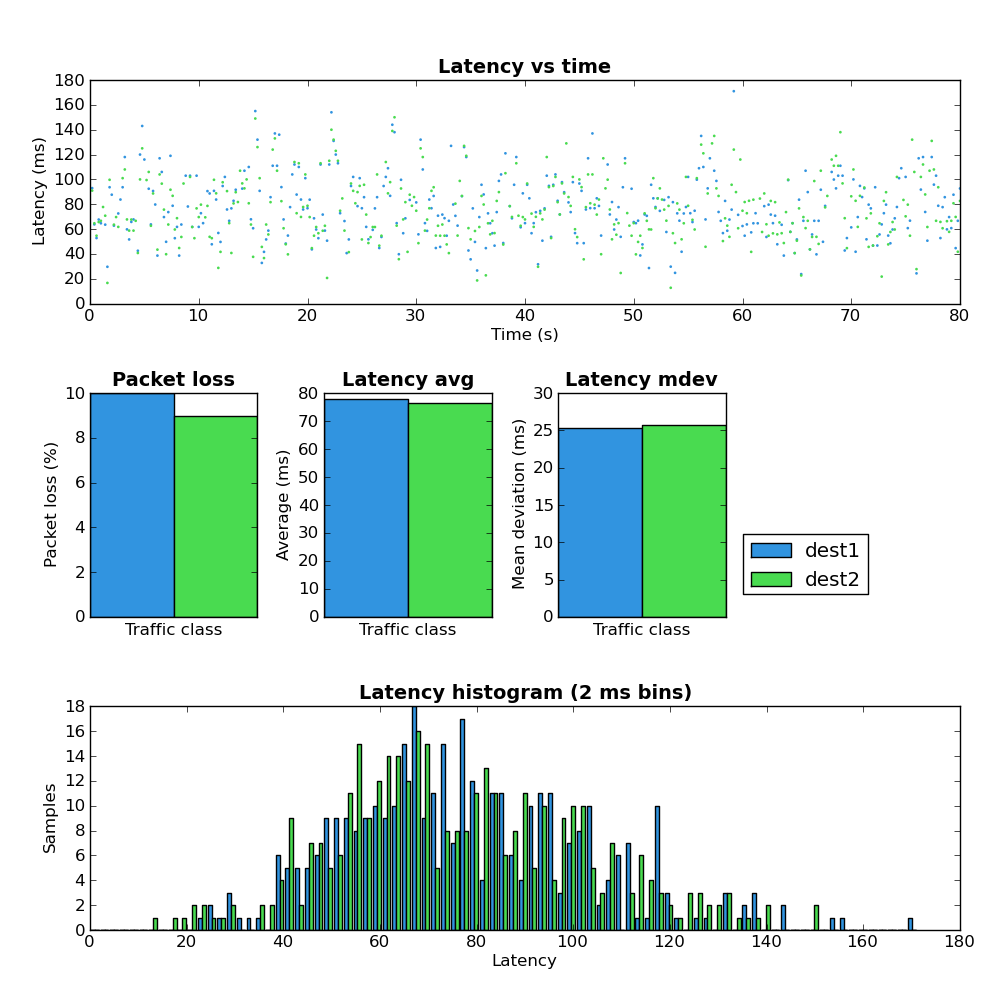
Network Load: Upload
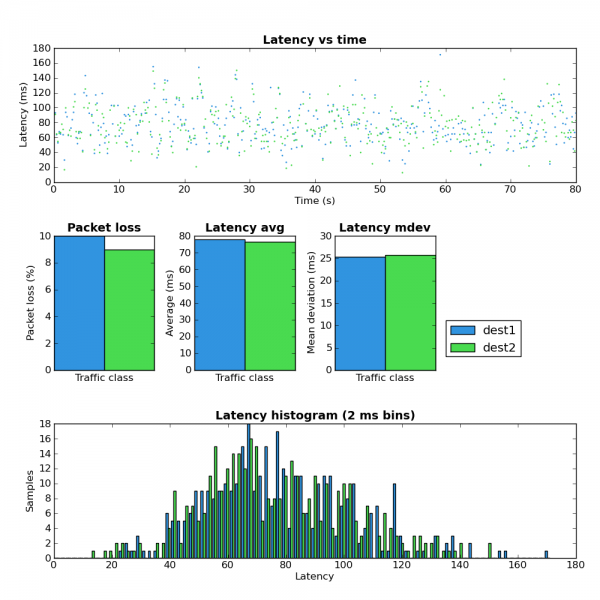
Figure 2: Host A - defaults - upload
Comparing figure 1 and figure 2 shows that when the upload portion of the link is under load both the latency and jitter greatly increase. However the maximum observed RTT at ~180ms isn’t terribly high which seems to indicate the upstream portion of the network does not suffer from extream Bufferbloat. Notice that the amount of packet loss increased from 0% to ~10%.
Even with the sane maximum latency as mentioned above this amount of packet loss would likely make any interactive service which relies on TCP (such as an SSH terminal) unusable due to the time required to recover from lost packets. I suspect 10% packet would also make VoIP conversations unusable but I don’t have any data to back that up.

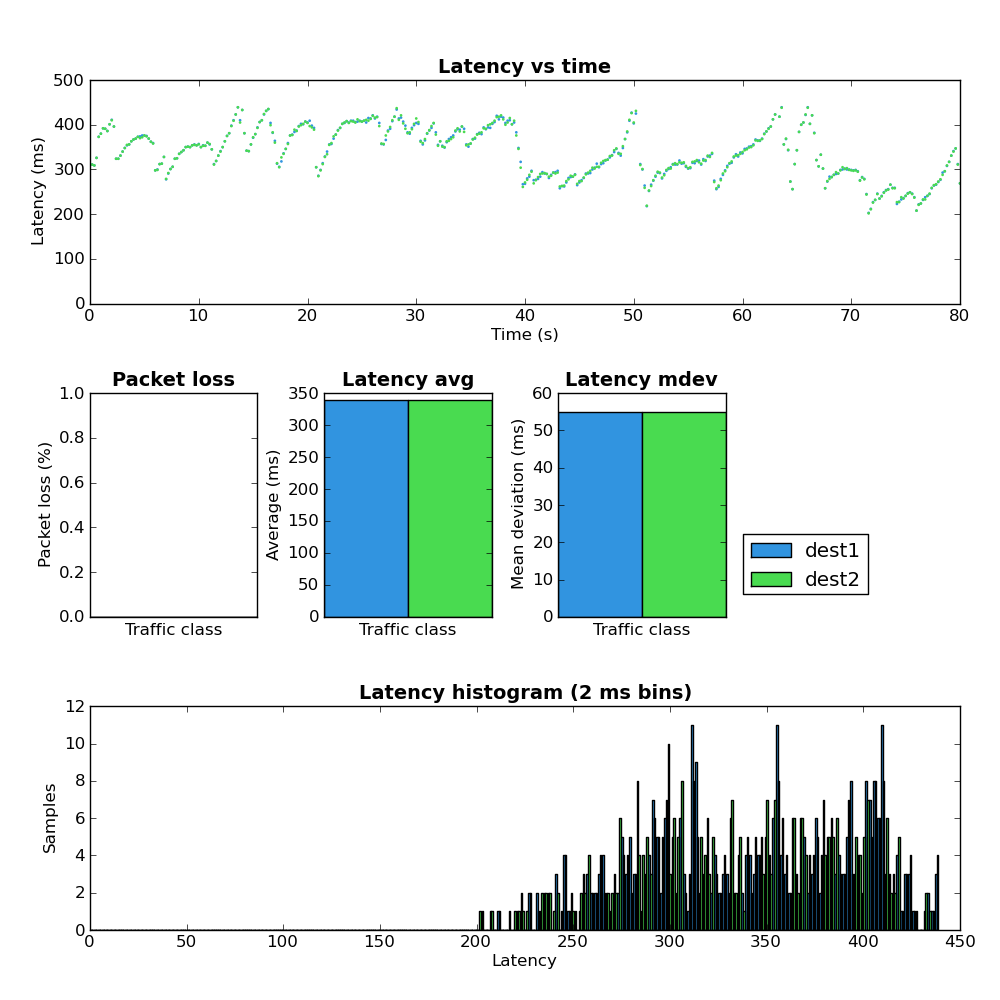
Network Load: Download
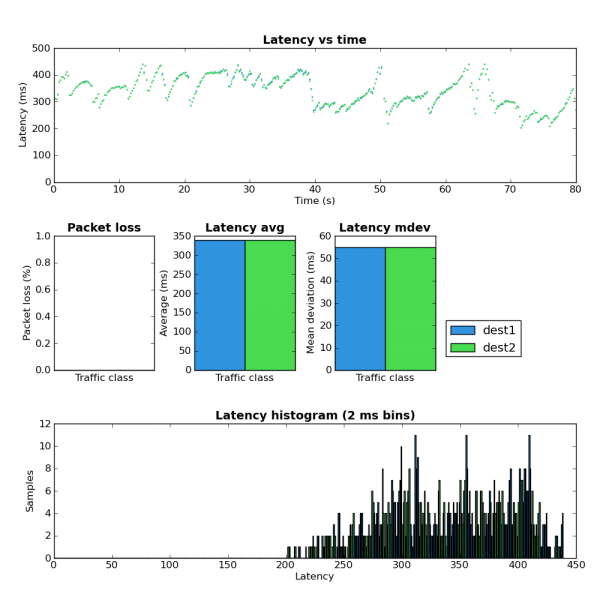
Figure 3: Host A - defaults - download
It’s hard to look at Figure 3 and not immediately be drawn to the interesting latency pattern in the top chart. I suspect that the relatively slow latency increases followed by a sudden latency drop are the result of the network queues filling and then quickly emptying after TCP reduces the send rate when it finally receives a loss event. There are two other things to note in Figure 3:
  • The overall latency is much worse in the download path.
  • There is no packet loss experienced by the test flows.
I’m at a loss to explain the latter point.

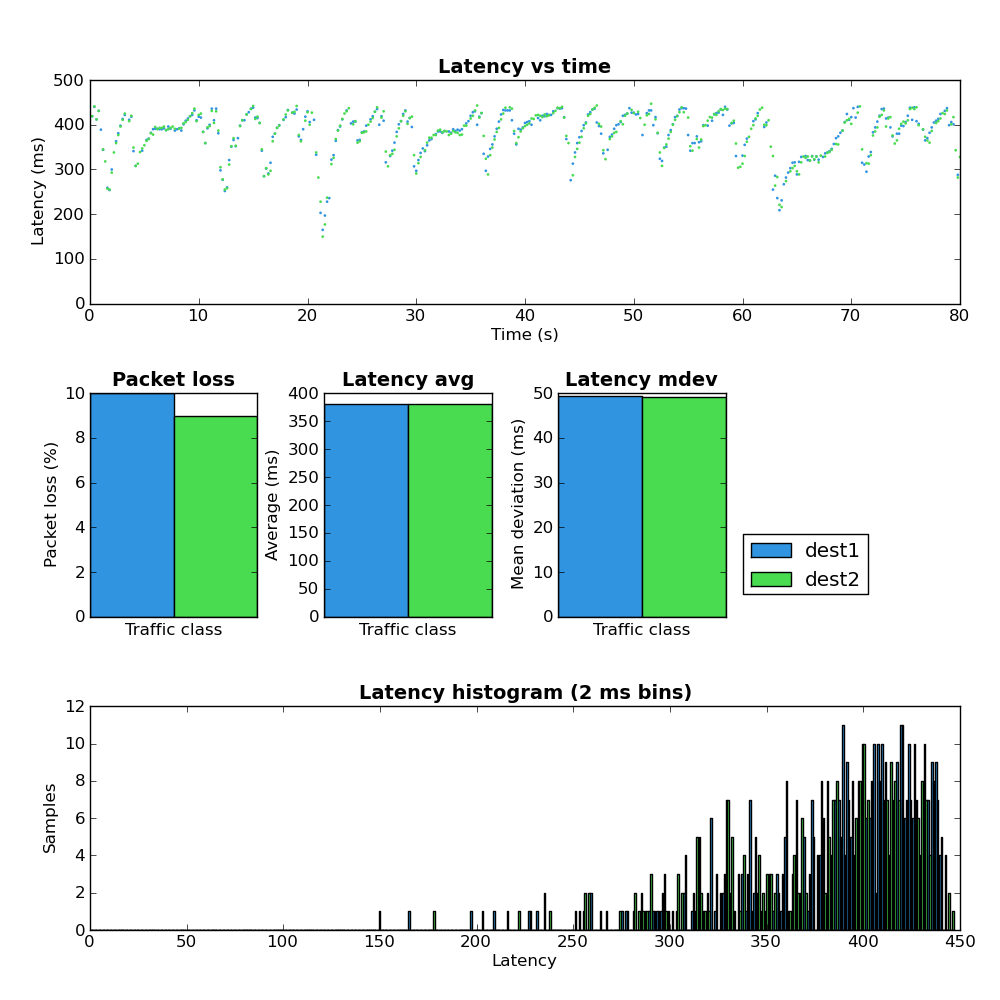
Network Load: Both
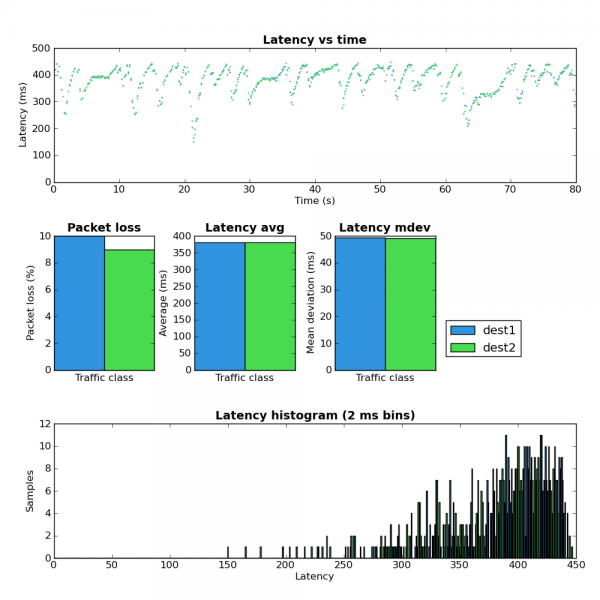
Figure 4: Host A - defaults - both
Figure 4 shows the latency results when under both upload and download load. Here the average latency increases beyond either the upload or download only case and the ‘latency sawtooth’ identified in Figure 3 becomes even more pronounced. The packet loss in Figure 4 is very close to the upload case (Figure 2) which matches well with the download results (Figure 3) where no packet loss was observed.

Experiment 2: Reduce buffers and shape

In this experiment the buffers on both ends of the Internet connection were reduced as follows:
  • Gateway
    • The TX queue length (ifconfig txqueuelen) was reduced to 1 packet for the ppp0 interface as well as the underlying eth2 interface.
    • The queueing discipline on eth2 was changed to a PFIFO with a buffer size of a single packet.
    • The queueing discipline on the ppp0 interface was changed to a PFIFO with buffer size of 3 packets which is equal to approximately 50ms at the maximum link rate.
  • Dest2
    • The TX queue length of the eth0 interface was reduced from the default of 1000 to 10.
    • The queueing discipline on the interface towards the home network was set as a PFIFO with a buffer size of 18 packets which is equal to approximately 50ms at the maximum link rate.
In addition to the above buffer changes, traffic shapers were also added to each end of the IPIP tunnel and set to a value below the available network throughput. This removes the effects of any buffering in intermediate network elements.

Network Load: Empty

As expected performing the test with no network load obtains results very similar to Figure 1.

Network Load: Upload
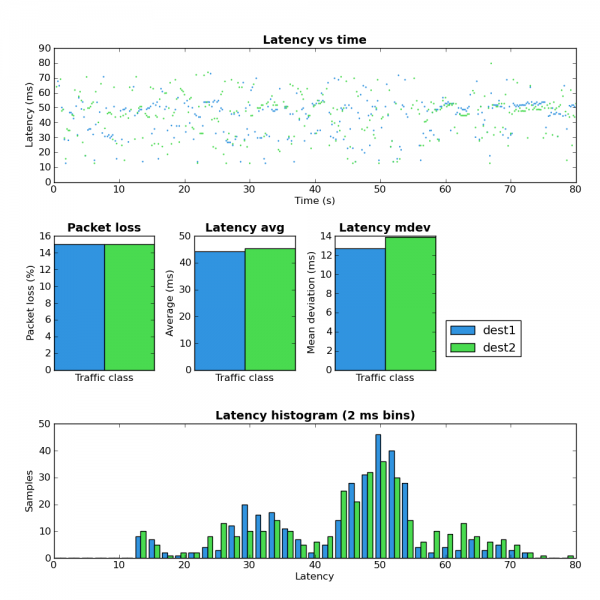
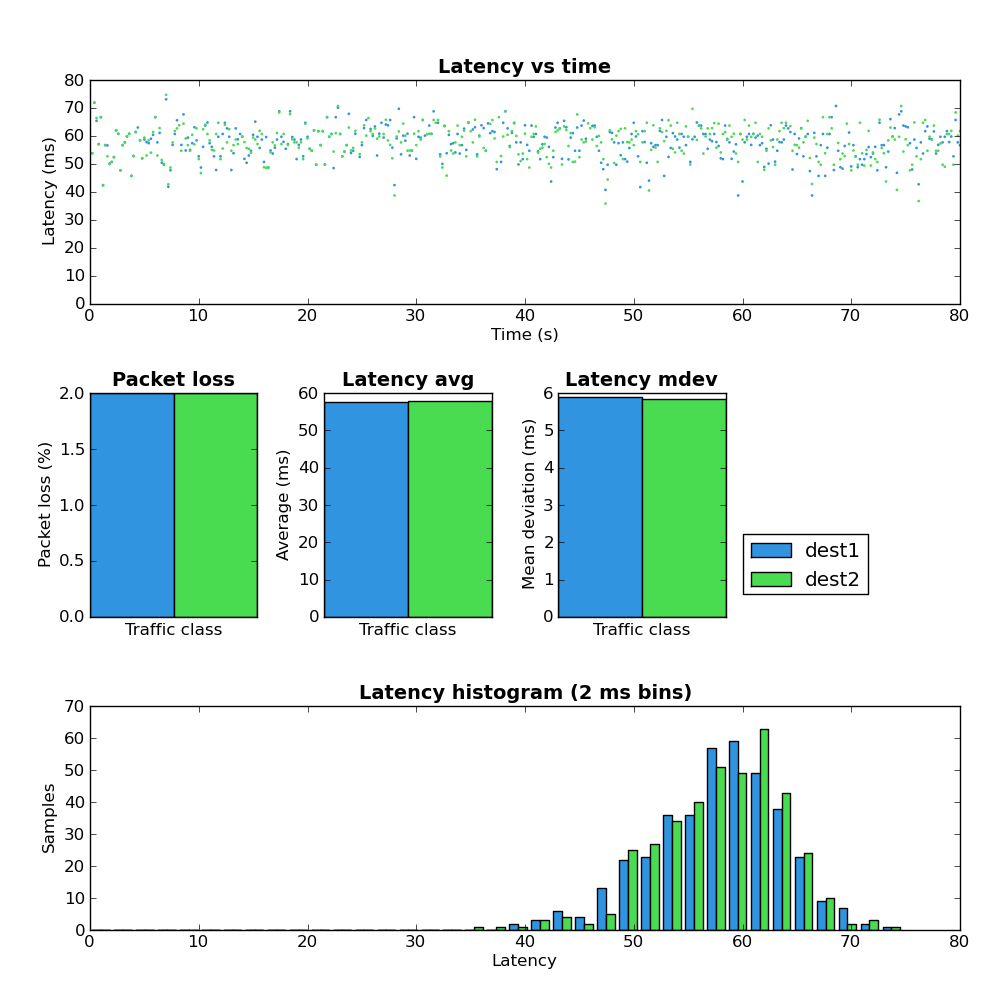
Figure 5: Host A - low buffers - upload
Comparing Figure 5 with Figure 2 shows a much better latency and jitter profile but the amount of packet loss is somewhat higher (~9%->14%).

Network Load: Download
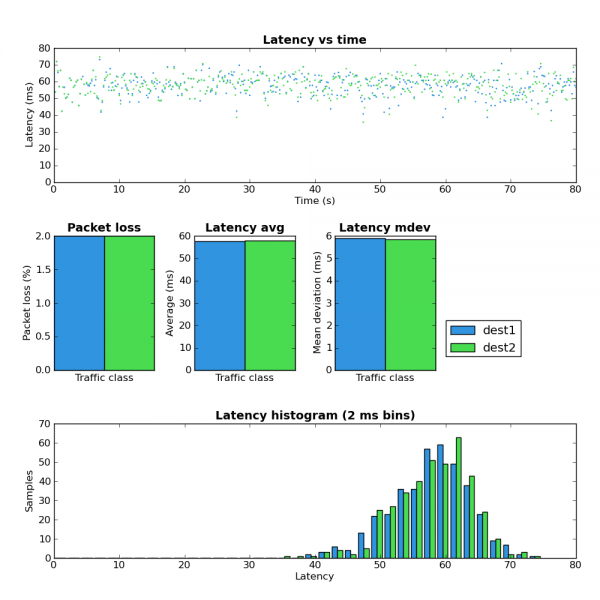
Figure 6: Host A - low buffers - download
Figure 6 shows no sign of the latency sawtooth behavior observed in Figure 3. This appears to confirm the theory that the large buffers were the cause of this phenomenon. Also note that latency and jitter are vastly improved but there is slightly higher packet loss (0%->2%).

Network load: Both
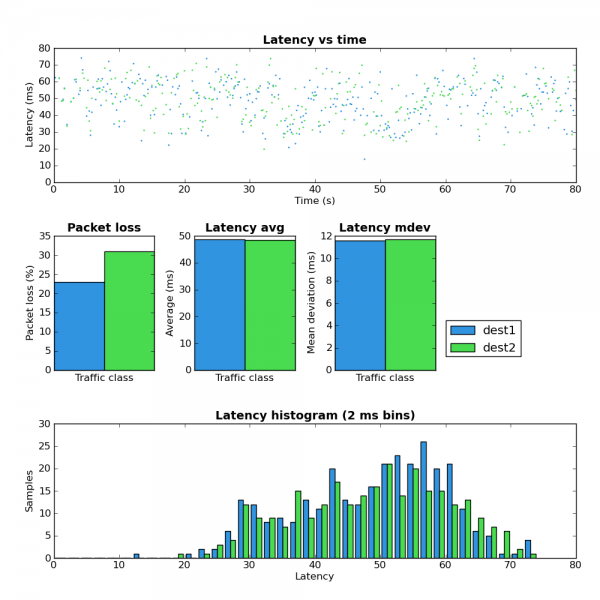
Figure 7: Host A - low buffers - both
Figure 7 shows a much better latency profile when compared with Figure 4 but note that the packet loss has increased to a very high level.

Experiment #3: Reduce interface buffers and shape plus SFB

Stochastic Fair Blue is an active queue management (AQM) scheme which has been suggested as a possible solution to the buffer bloat problem. Due to the fact that SFB currently requires a custom kernel module I chose not to install it on Dest2. This server isn’t easy for me to get access to should something go wrong. I did however install it on the local gateway to obtain upload results.
The only change between this experiment (#3) and #2 is the replacement of the PFIFO queue on the gateway with a SFB queue. SFB has the ability to mark IP packets via ECN when they experience congestion. Both Host A and Dest2 have ECN enabled and ECN marked IP and TCP packets were observed during this test.
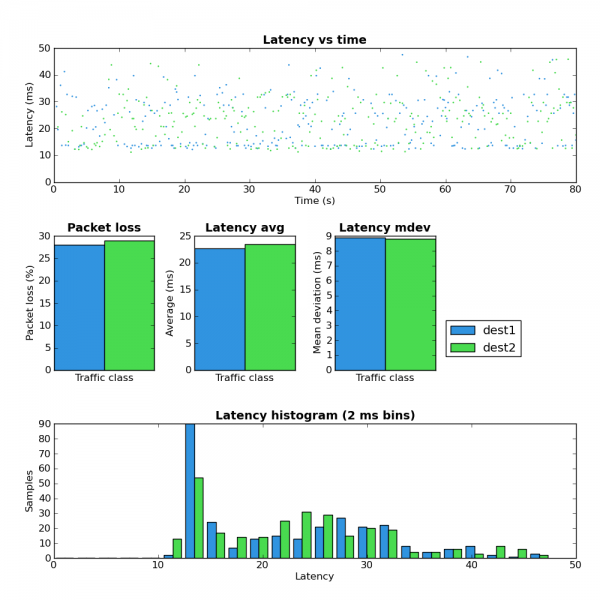
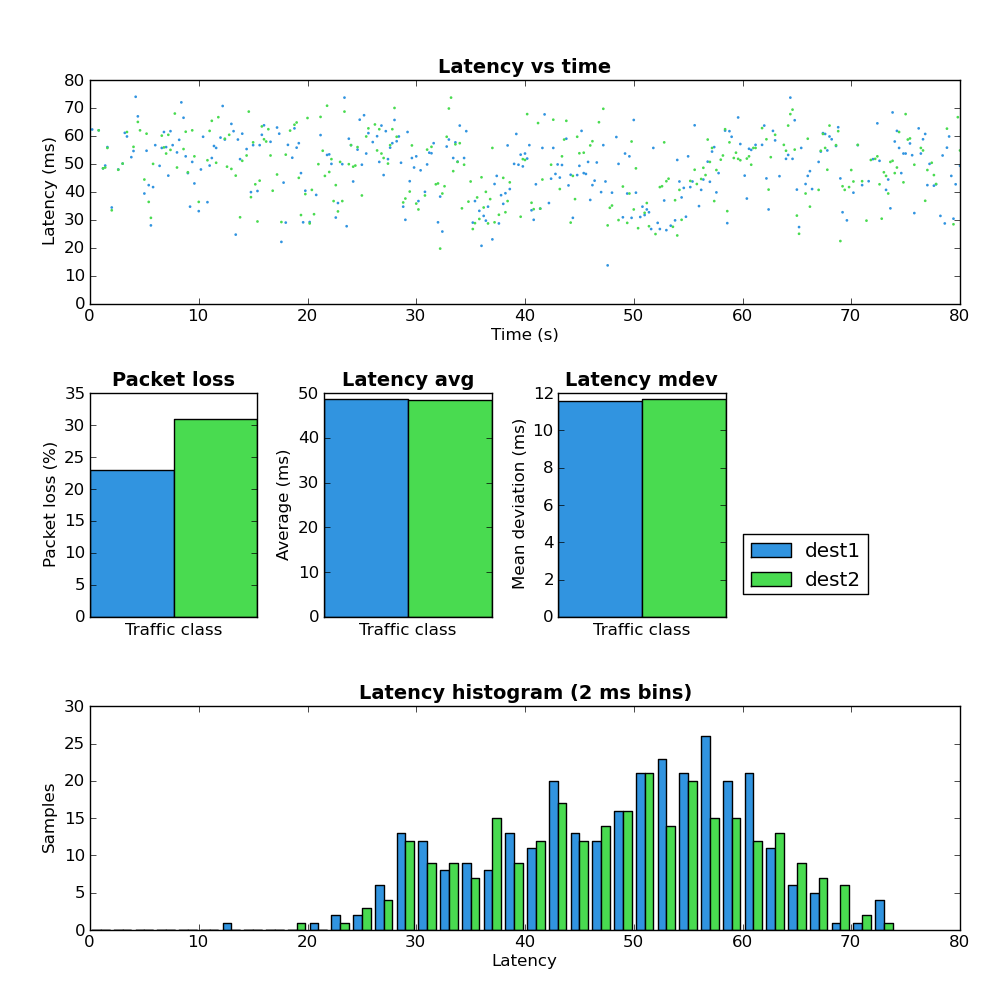
Figure 8: Host A - low buffers - sfb - upload
Comparing figure 8 against figures 2 and 5 shows that SFB does have a better latency profile vs a simple FIFO but the packet loss is also significantly higher. I haven’t done enough experimentation with SFB to really understand how to use it effectively but these results do seem to indicate that it’s worth spending more time with.

Experiment #4: Sane buffers plus SFQ

This experiment maintains the buffer size optimizations from experiments 2 and 3 but adds a SFQ queue to each end of the connection. SFQ aims to create per-flow fairness. On the downstream the SFQ queue length (limit parameter) was set to eighteen and on the upstream it was set to three. Both of these values result in approximately 50ms transmission time.

Network load: Upload
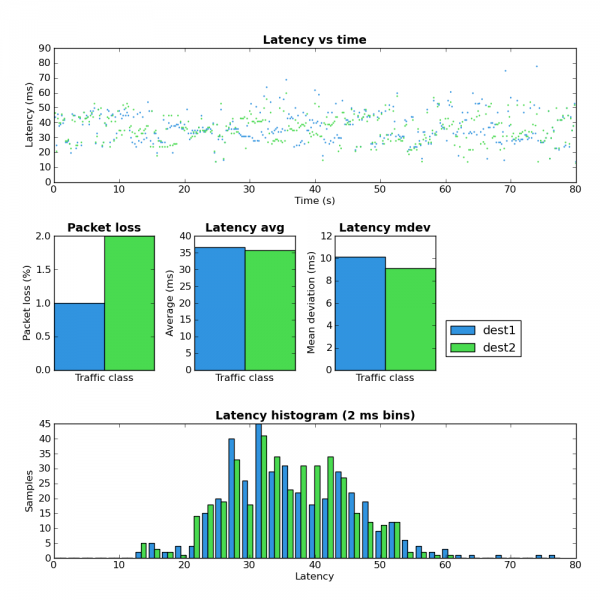
Figure 9: Host A - low buffers - sfq - upload
Figure 9′s direct comparisons are figures 2, 5, 8. Only the SFB case (Figure 8) has lower average latency and all other scenarios have far higher packet loss.

Network load: Download
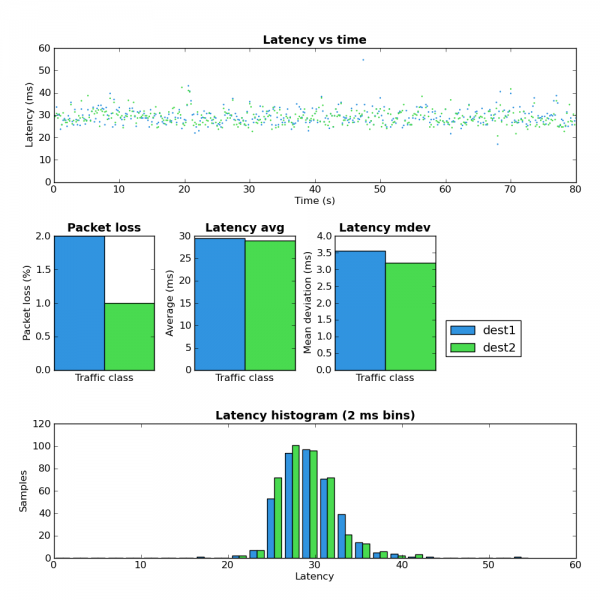
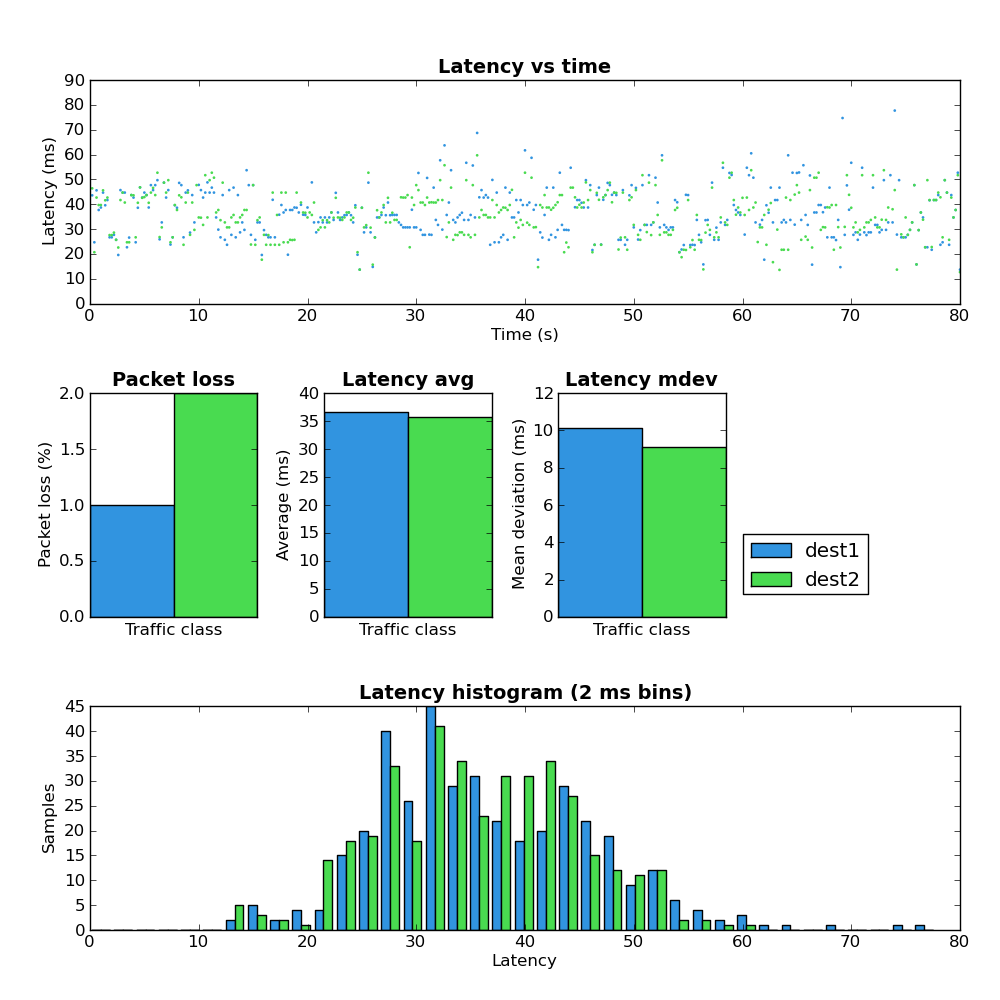
Figure 10: Host A - low buffers - sfq - download
Figure 10′s comparisons are Figures 3 and 6. Figure 10 shows a better latency profile vs the other scenarios with equivalent or better packet loss.

Network load: Both
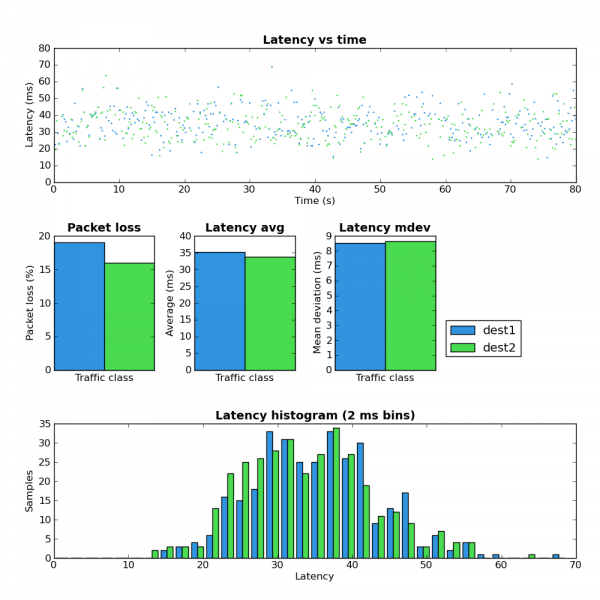
Figure 11: Host A - low buffers - sfq - both
Comparisons: Figures 4 and 7.
In this test the bidirectionally loaded link shows a lot of packet loss but latency is better than the other scenarios.

Throughput

During these experiments I did not make any effort to compare the overall network throughput. This would be a worthwhile endeavour but anecdotally at least any throughput difference is relatively minor and is a cost worth paying in order to achieve improved latency.

Summary

These experiments show the dramatic difference in network latency which can be obtained by modifying the size of packet buffers and adding a bit of traffic classification (SFQ). Among the tested scenarios, SFQ + sane buffers sizes gives the best performance.
When I started this post I had hoped to go through a few more scenarios but that will have to wait for another time. Specifically I wanted to show the results of the somewhat more complicated scheme that I use on a daily basis. This scheme gives much better results than any of the ones presented above. If you are interested and understand how to use tc you can see the scripts here.

Courtesy : http://www.coverfire.com/archives/2011/02/21/network-latency-experiments/

Optimization of TCP/IP Traffic Across Shared ADSL

This thesis presents practical studies of the TCP performance problems caused by the asymmetric nature of ADSL connections. Previously, it has been shown on other types of asymmetric links that TCP throughput may be reduced due to a variable and imperfect ACK feedback. The upstream capacity of ADSL products in general does not disturb the ACK feedback mechanism, but we analyze and document that TCP traffic across ADSL in fact is affected by the asymmetric nature of ADSL, when utilizing the upstream capacity. For a single user ADSL installation it is manageable to avoid upstream congestion, but for larger networks, connected to the Internet by ADSL, the rise of peer-to-peer file sharing applications may result in a permanently congested upstream link.
The thesis provides evidence that the achievable downstream throughput is reduced significantly in case of a saturated upstream link. Saturation of the upstream link introduces a high queueing delay that effectively renders the connection useless for interactive and other delay-sensitive applications (like VoIP).
Previous work within the field of asymmetry has primarily been concerned with optimizing downstream throughput. Our solution incorporates latency as an important design parameter in order to support different types of network applications at the same time. The thesis also provides a practical solution to mitigate these problems. We demonstrate how it is possible to achieve full downstream and upstream utilization, while at the same time supporting different delay-sensitive applications, using the packet scheduler of a Linux based middlebox between the network and the ADSL connection.
On ADSL the available bandwidth for IP traffic varies significantly, which is caused by protocol overhead and packet/cell aligning at the ATM/AAL5 link layer. Depending on packet sizes the available bandwidth can be reduced up to 62 percentage. Therefore, a packet scheduler needs to account for the varying available bandwidth by accounting for the link layer overhead. As part of implementing a practical solution, based on Linux, the Linux Traffic Control system have been modified to perform accurate packet scheduling through modeling the ATM link layer overhead of ADSL.

Saturday, March 26, 2011

Lintrack ( Linux for Internet Service Providers)

Lintrack is a GNU/Linux distribution which can be used as:
  • wireless router
  • network access server
  • PPPoE server
  • HotSpot server
  • VPN server/client
  • firewall
  • traffic shaper
  • HTTP content filter
  • OSPF router
  • PIMv2 (multicast) router
  • and more - see Features
What makes Lintrack unique is that it is highly integrated and automated by the Flatconf configuration system. Lintrack is mainly administered using an interactive CLI tool, fcc, which makes system configuration easy and fast.
While giving the end user a powerful, high-level interface, Lintrack has still all of the possibilities of traditional Linux administration. What's more, some functionality may be managed by fcc, and some by die-hard Unix tools, e.g. vim.
Lintrack has also many unique features exclusively developed by our team, like improved MadWiFi driver with better 802.11h support and many bugs fixed, dynamic weighted round-robin Ethernet bonding, RADIUS client with solid-state queue, QoS layer-7 firewall with DiffServ support and basic HTTP advertisements distribution framework, just to name a few.
Currently, we target x86 CPU architectures only, but support for other architectures is planned in near future. A typical installation needs at least 256MB of storage space, but 512MB is recommended.

Lintrack features? Citing one of our developers, "probably more than you will ever need ;-)". Below list presents Lintrack functionality as of version 2.0.
  • based on Linux kernel 2.6
    • support for Reiser4
    • in-kernel interface descriptions
    • in-kernel IP address descriptions
  • centralized, unified system configuration - Flatconf
    • interactive command-line interface with autocompletion - fcc
    • English and Polish translations
  • IPv4 support
  • IPv6 support (partially)
  • IPsec support
  • VLAN support (in Linux thanks to Candelatech)
    • 802.1Q VLAN on Ethernet devices
    • MACVLAN
  • IP traffic shaping
  • IP filtering
    • powerful zone-based firewall
      • DiffServ marking basing on QoS characteristics (ASN DiffServ tags)
        • bulk - eg. downloads, P2P
        • office - eg. web browsing, email
        • media - eg. streaming media, VoIP
        • txt - eg. IM, IRC, SSH
        • sys - eg. DNS, TCP ACKs
      • decreasing TCP MSS to path MTU
      • removing IP DF flag
      • masquerading
      • DNAT
      • custom rules
    • apart of standard Netfilter functionality:
  • IP routing
    • static routing
      • multitable routing
      • multipath routing (random, wrandom, rr, drr)
    • dynamic routing
      • OSPFv2 (Quagga), with dynamic path costs
      • PIM-SM (multicast) - patched pimd
  • Atheros WiFi devices - MadWiFi improved by Lintrack team
    • tested chipsets: AR5211, AR5212, AR5213
    • parts of IEEE 802.11h and 802.11d needed to satisfy the ETSI EN 301 893 requirements (DFS, TPC)
    • Super A/G support: bursting mode, fast frames, compression
    • easy regdomain changing (ar5k)
    • Virtual AP (VAP) support: up to 4 interfaces on one device (AP, station, monitor)
    • WDS support (standards-conforming)
    • AP clients isolation
    • Wireless Multimedia Extensions (WME) support
    • MAC address policies
    • full WPA and WPA2 (RSN) support - great hostapd and wpa_supplicant
      • PSK, EAP-TLS, EAP-TTLS, EAP-PEAP
      • embedded RADIUS server
  • Ethernet devices - all that Linux supports (most on market)
  • Ethernet bonding
    • weighted round-robin (wrr) mode developed by Lintrack team
    • dynamic wrr weights
    • 2-seconds reaction to link loss
    • support for IP addresses on slave interfaces
    • works with WPA on Madwifi interfaces
  • Ethernet bridging with Spanning Tree Protocol support
  • transparent ("cheap") Ethernet encryption (ccrypt)
    • does not need higher MTU
    • does not fragment frames
  • PPPoE support - patched Roaring Penguin's RP-PPPoE
    • PPPoE client
    • PPPoE relay agent
    • PPPoE server
      • PAP/CHAP authentication
      • local IP address pool
      • RADIUS support
        • supports ASN RADIUS dictionary
          • bandwidth limits
          • pps limits
          • TCP connections limits
          • server-side client firewall
          • server-side QoS traffic shaping
            • SFQ
            • per-client HTB queue
              • prioritizing traffic basing on ASN DiffServ tags
              • different bandwidth limits for localmedia-tagged traffic (eg. locally generated multimedia streams)
          • IP redirections with optional randomness
          • per-client HTTP content filter settings
            • redirection URL
            • content groups to match
            • web domains to match
        • solid-state, reliable RADIUS queue
        • possibility to obtain client IP address from RADIUS reply
  • IP tunneling: GRE, IPIP, SIT
  • OpenVPN support
    • point-to-point mode
    • IP tunneling / Ethernet bridging
    • TCP/UDP transport
    • static PSK and SSL modes
  • HotSpot network access - ChilliSpot
  • HTTP proxy - Squid
  • DNS cache and DHCP server - dnsmasq
  • real-time per-IP link quality measurements - ifquald
    • ICMP echo test (latency, packet loss) - reliability
    • iperf bandwidth test - performance
  • SNMP agent - Net-SNMP
    • SNMPv2 and simple SNMPv3 support
    • engine for quick snmpd extensions
      • fetching arbitrary netfilter rule counters
      • fetching all information about link monitored by ifquald
  • easy to use package manager: pkg
    • multiple repositories
    • Lintrack repository with almost 150 packages
  • tight, system-wide integration with SSL/TLS
  • automatic time synchronization via NTPv4
Apart of that, a technically skilled user will find the following software in Lintrack:
Courtesy : http://www.lintrack.org/index.php/about

Zentyal 2.0

  • Networking
    • Firewall and routing
      • Filtering
      • NAT and port redirections
      • VLAN 802.1Q
      • Support for multiple PPPoE and DHCP gateways
      • Multi-gateway rules, load balancing and automatic failover
      • Traffic shaping (with application layer support)
      • Bridged mode
      • Graphical traffic rate monitoring
      • Network intrusion detection system
      • Dynamic DNS client
    • Network infrastructure
      • DHCP server
      • NTP server
      • DNS server
        • Dynamic updates via DHCP
      • RADIUS server
    • VPN support
      • Dynamic routes autoconfiguration
    • HTTP proxy
      • Internet cache
      • User authentication
      • Content filtering (with categorized lists)
      • Transparent antivirus
      • Delay pools
    • Intrusion Detection System
    • Mail Server
      • Virtual domains
      • Quotas
      • SIEVE support
      • External account retrieval
      • POP3 and IMAP with SSL/TLS
      • Spam and antivirus filtering
        • Greylisting, blacklisting, whitelisting
      • Transparent POP3 proxy filter
      • Catch-all account

  • Webmail
  • Web server
    • Virtual hosts
  • Certification authority
  • Workgroup
    • Centralized users and groups management
      • Master/slave support
      • Windows Active Directory Synchronization
    • Windows PDC
      • Password policies
      • Support for Windows 7 clients
    • Network resource sharing
      • File server
        • Antivirus
        • Recycle bin
      • Print server
    • Groupware: calendar, address book, contacts, etc.
    • VoIP server
      • Voicemail
      • Conference rooms
      • Calls through an external provider
      • Call transfers
      • Call parking
      • Music on hold
      • Queues
      • Logs

  • Jabber/XMMP server
    • Conference rooms
  • FTP server
  • Zentyal User Corner for self users info updating
  • Reporting and monitoring
    • Dashboard for centralized service information
    • Monitor CPU, load, disk space, thermal, memory
    • Disk usage and RAID status
    • Summarized and full system reports
    • Event notification via mail, RSS or Jabber
  • Software updates
  • Backups (configuration and remote data backup) 
Courtesy : http://trac.zentyal.org/wiki/Features

BRIDGE HTB EBTABLES

Bridging

1.1 - Installa

1.2 - Configure

1.3 - Status

QOS htb queueing

2.1 - Configuratie

2.3 - Status

Ebtables filter

3.1 - Configuratie

3.3 - Status


1.1 - Installatie

Add atrpms repository bij yum en installeer
echo "[atrpms]
 name=Fedora Core $releasever - $basearch - ATrpms
 baseurl=http://dl.atrpms.net/fc$releasever-$basearch/atrpms/stable" >> /etc/yum.conf
 
 [root@bridge ~]# yum install ebtables bridge-utils
 Setting up Install Process
 Setting up Repos
 atrpms                    100% |=========================|  951 B    00:00
 base                      100% |=========================| 1.1 kB    00:00
 updates-released          100% |=========================|  951 B    00:00
 Reading repository metadata in from local files
 atrpms    : ################################################## 1078/1078
 base      : ################################################## 2622/2622
 updates-re: ################################################## 970/970
 Parsing package install arguments
 No Match for argument: ebtables
 Resolving Dependencies
 --> Populating transaction set with selected packages. Please wait.
 ---> Package bridge-utils.i386 0:1.0.4-4 set to be updated
 --> Running transaction check
 --> Processing Dependency: libsysfs.so.1 for package: bridge-utils
 --> Restarting Dependency Resolution with new changes.
 --> Populating transaction set with selected packages. Please wait.
 ---> Package sysfsutils.i386 0:1.2.0-1 set to be updated
 --> Running transaction check
 
 Dependencies Resolved
 Transaction Listing:
   Install: bridge-utils.i386 0:1.0.4-4 - base
 
 Performing the following to resolve dependencies:
   Install: sysfsutils.i386 0:1.2.0-1 - base
 Total download size: 83 k
 Is this ok [y/N]: y
 Downloading Packages:
 (1/2): bridge-utils-1.0.4 100% |=========================|  27 kB    00:00
 (2/2): sysfsutils-1.2.0-1 100% |=========================|  56 kB    00:00
 Running Transaction Test
 Finished Transaction Test
 Transaction Test Succeeded
 Running Transaction
 Installing: sysfsutils 100 % done 1/2
 Installing: bridge-utils 100 % done 2/2
 
 Installed: bridge-utils.i386 0:1.0.4-4
 Dependency Installed: sysfsutils.i386 0:1.2.0-1
 Complete!

1.2 - Configuratie

Edit de volgende files
file /etc/sysconfig/network-scripts/ifcfg-br0
 DEVICE=br0
 TYPE=Bridge
 BOOTPROTO=static
 IPADDR=192.168.1.2
 NETMASK=255.255.255.0
 GATEWAY=192.168.1.1
 ONBOOT=yes
 DELAY=30
 STP=ON

 file /etc/sysconfig/network-scripts/ifcfg-eth0
 DEVICE=eth0
 TYPE=ETHER
 BRIDGE=br0
 ONBOOT=yes
 
 file /etc/sysconfig/network-scripts/ifcfg-eth1
 DEVICE=eth1
 TYPE=ETHER
 BRIDGE=br0
 ONBOOT=yes

1.3 - Status


[root@bridge root]# brctl showstp br0
br0
 bridge id              8000.0010a403d44a
 designated root        0001.00d003db8401
 root port                 1                    path cost                101
 max age                  20.00                 bridge max age            20.00
 hello time                2.00                 bridge hello time          2.00
 forward delay            15.00                 bridge forward delay      15.00
 ageing time             300.00                 gc interval                4.00
 hello timer               0.00                 tcn timer                  0.00
 topology change timer     0.00                 gc timer                   2.92
 flags


eth0 (1)
 port id                8001                    state                   forwarding
 designated root        0001.00d003db8401       path cost                100
 designated bridge      c000.0002fd81cc01       message age timer          2.40
 designated port        8089                    forward delay timer        0.00
 designated cost           1                    hold timer                 0.00
 flags

eth1 (2)
 port id                8002                    state                   forwarding
 designated root        0001.00d003db8401       path cost                100
 designated bridge      8000.0010a403d44a       message age timer          0.00
 designated port        8002                    forward delay timer        0.00
 designated cost         101                    hold timer                 0.00
 flags

2.1 Configuratie

file path/htb.sh (ik plaats scripts altijd in /scripts/htb.sh)
 if [ "$1" = "status" ]
 then
 /sbin/tc -s class ls dev eth0
 /sbin/tc -s class ls dev eth1
 exit
        fi
 if [ "$1" = "stop" ]
         then
                 /sbin/tc qdisc del dev eth0 root    2> /dev/null > /dev/null
                 /sbin/tc qdisc del dev eth1 root    2> /dev/null > /dev/null
                 echo "STOP = OK"
                 exit
         fi
 if [ "$1" = "start" ]
         then
 # RULES
 # cleanup
 /sbin/tc qdisc del dev eth0 root    2> /dev/null > /dev/null
 /sbin/tc qdisc del dev eth1 root    2> /dev/null > /dev/null
 
 # eth0 (external)
 tc qdisc add dev eth0 root handle 1: htb
 tc class add dev eth0 parent 1: classid 1:1 htb rate 10000kbit ceil 10000kbit
 tc class add dev eth0 parent 1:1 classid 1:2 htb rate 2000kbit ceil 2000kbit prio 1
 tc class add dev eth0 parent 1:1 classid 1:3 htb rate 2000kbit ceil 2000kbit prio 1
 tc class add dev eth0 parent 1:1 classid 1:4 htb rate 512kbit ceil 512kbit prio 1
 tc class add dev eth0 parent 1:4 classid 1:41 htb rate 256kbit ceil 384kbit prio 1 burst 2kbit
 tc class add dev eth0 parent 1:4 classid 1:42 htb rate 128kbit ceil 450kbit prio 2 burst 2kbit
 tc class add dev eth0 parent 1:4 classid 1:43 htb rate 128kbit ceil 450kbit prio 3 burst 2kbit
 
 # eth1 (internal)
 tc qdisc add dev eth1 root handle 2: htb
 tc class add dev eth1 parent 2: classid 2:1 htb rate 10000kbit ceil 10000kbit
 tc class add dev eth1 parent 2:1 classid 2:2 htb rate 2000kbit ceil 2000kbit prio 1
 tc class add dev eth1 parent 2:1 classid 2:3 htb rate 2000kbit ceil 2000kbit prio 1
 tc class add dev eth1 parent 2:1 classid 2:4 htb rate 512kbit ceil 512kbit prio 1
 tc class add dev eth1 parent 2:4 classid 2:41 htb rate 256kbit ceil 384kbit prio 1 burst 2kbit
 tc class add dev eth1 parent 2:4 classid 2:42 htb rate 128kbit ceil 450kbit prio 2 burst 2kbit
 tc class add dev eth1 parent 2:4 classid 2:43 htb rate 128kbit ceil 450kbit prio 3 burst 2kbit
 
 # filters
 tc filter add dev eth0 parent 1: protocol ip prio 1 handle 0x12 fw classid 1:2
 tc filter add dev eth0 parent 1: protocol ip prio 1 handle 0x13 fw classid 1:3
 tc filter add dev eth0 parent 1: protocol ip prio 1 handle 0x141 fw classid 1:41
 tc filter add dev eth0 parent 1: protocol ip prio 1 handle 0x142 fw classid 1:42
 tc filter add dev eth0 parent 1: protocol ip prio 1 handle 0x143 fw classid 1:43
 
 tc filter add dev eth1 parent 2: protocol ip prio 1 handle 0x22 fw classid 2:2
 tc filter add dev eth1 parent 2: protocol ip prio 1 handle 0x23 fw classid 2:3
 tc filter add dev eth1 parent 2: protocol ip prio 1 handle 0x241 fw classid 2:41
 tc filter add dev eth1 parent 2: protocol ip prio 1 handle 0x242 fw classid 2:42
 tc filter add dev eth1 parent 2: protocol ip prio 1 handle 0x243 fw classid 2:43
 ####### END
 exit
 fi

2.2 Status

path/htb.sh status
 class htb 1:1 root rate 10Mbit ceil 10Mbit burst 2848b cburst 2848b
  Sent 2233403355 bytes 10596183 pkts (dropped 0, overlimits 0 requeues 0)
  rate 9541bit 66pps
  lended: 0 borrowed: 0 giants: 0
  tokens: 2296 ctokens: 2296
 
 class htb 1:2 parent 1:1 prio 1 rate 2Mbit ceil 2Mbit burst 1849b cburst 1849b
  Sent 65253934 bytes 565473 pkts (dropped 0, overlimits 0 requeues 0)
  rate 95bit 1pps
  lended: 565473 borrowed: 0 giants: 0
  tokens: 7217 ctokens: 7217
 
 class htb 1:3 parent 1:1 prio 1 rate 2Mbit ceil 2Mbit burst 1849b cburst 1849b
  Sent 435637962 bytes 2681434 pkts (dropped 0, overlimits 0 requeues 0)
  rate 6009bit 42pps
  lended: 2681434 borrowed: 0 giants: 0
  tokens: 7315 ctokens: 7315
 
 class htb 1:4 parent 1:1 rate 512Kbit ceil 512Kbit burst 1663b cburst 1663b
  Sent 1732511459 bytes 7349276 pkts (dropped 0, overlimits 0 requeues 0)
  rate 3771bit 23pps
  lended: 1055164 borrowed: 0 giants: 0
  tokens: 25856 ctokens: 25856
 
 class htb 1:41 parent 1:4 prio 1 rate 256Kbit ceil 384Kbit burst 255b cburst 1647b
  Sent 108119387 bytes 888473 pkts (dropped 0, overlimits 0 requeues 0)
  rate 63bit
  lended: 865360 borrowed: 23113 giants: 0
  tokens: 6654 ctokens: 34134
 
 class htb 1:42 parent 1:4 prio 2 rate 128Kbit ceil 450Kbit burst 255b cburst 1655b
  Sent 569607767 bytes 2244715 pkts (dropped 0, overlimits 0 requeues 0)
  rate 2745bit 17pps
  lended: 1914731 borrowed: 329984 giants: 0
  tokens: 12286 ctokens: 29273
 
 class htb 1:43 parent 1:4 prio 3 rate 128Kbit ceil 450Kbit burst 255b cburst 1655b
  Sent 1054784305 bytes 4216088 pkts (dropped 0, overlimits 0 requeues 0)
  rate 983bit 5pps
  lended: 3514021 borrowed: 702067 giants: 0
  tokens: -4098 ctokens: 24322
 
 class htb 2:1 root rate 10Mbit ceil 10Mbit burst 2848b cburst 2848b
  Sent 7775491380 bytes 12322177 pkts (dropped 0, overlimits 0 requeues 0)
  rate 302Kbit 73pps
  lended: 0 borrowed: 0 giants: 0
  tokens: 2296 ctokens: 2296
 
 class htb 2:2 parent 2:1 prio 1 rate 2Mbit ceil 2Mbit burst 1849b cburst 1849b
  Sent 316055870 bytes 561775 pkts (dropped 0, overlimits 0 requeues 0)
  rate 31bit
  lended: 561775 borrowed: 0 giants: 0
  tokens: 6857 ctokens: 6857
 
 class htb 2:3 parent 2:1 prio 1 rate 2Mbit ceil 2Mbit burst 1849b cburst 1849b
  Sent 1812476557 bytes 3159408 pkts (dropped 0, overlimits 0 requeues 0)
  rate 31491bit 50pps
  lended: 3159408 borrowed: 0 giants: 0
  tokens: 1384 ctokens: 1384
 
 class htb 2:4 parent 2:1 rate 512Kbit ceil 512Kbit burst 1663b cburst 1663b
  Sent 5646958953 bytes 8600994 pkts (dropped 0, overlimits 0 requeues 0)
  rate 6591bit 22pps
  lended: 3719768 borrowed: 0 giants: 0
  tokens: 25856 ctokens: 25856
 
 class htb 2:41 parent 2:4 prio 1 rate 256Kbit ceil 384Kbit burst 255b cburst 1647b
  Sent 436207585 bytes 1135807 pkts (dropped 0, overlimits 0 requeues 0)
  rate 147bit 1pps
  lended: 920005 borrowed: 215802 giants: 0
  tokens: 1278 ctokens: 30548
 
 class htb 2:42 parent 2:4 prio 2 rate 128Kbit ceil 450Kbit burst 255b cburst 1655b
  Sent 874495734 bytes 2302671 pkts (dropped 0, overlimits 0 requeues 0)
  rate 5602bit 17pps
  lended: 1680038 borrowed: 622633 giants: 0
  tokens: 12286 ctokens: 29273
 
 class htb 2:43 parent 2:4 prio 3 rate 128Kbit ceil 450Kbit burst 255b cburst 1655b
  Sent 4336255634 bytes 5162516 pkts (dropped 0, overlimits 0 requeues 0)
  rate 1555bit 3pps
  lended: 2281183 borrowed: 2881333 giants: 0
  tokens: -1538 ctokens: 25050
 

3.1 Configuratie

A="/sbin/ebtables"

if [ "$1" = "status" ]
        then
        $A -L --Lc
        exit
fi
if [ "$1" = "stop" ]
        then
        $A -F
        exit
fi
if [ "$1" = "start" ]
        then
        $A -F
 $A -A FORWARD -p IPv4 --ip-src 192.168.1.0/24 -o eth1 -j mark --set-mark 0x23 --mark-target ACCEPT
 $A -A FORWARD -p IPv4 --ip-dst 192.168.1.0/24 -o eth0 -j mark --set-mark 0xr13 --mark-target ACCEPT
 $A -A FORWARD -o eth0 -j mark --set-mark 0x143 --mark-target ACCEPT
 $A -A FORWARD -o eth1 -j mark --set-mark 0x243 --mark-target ACCEPT
        exit
fi

3.2 status

ebtables.sh status
-p IPv4 -o eth1 --ip-src 192.168.1.0/24 -j mark --set-mark 0x23, pcnt = 0 -- bcnt = 0
-p IPv4 -o eth0 --ip-dst 192.168.1.0/24 -j mark --set-mark 0x13, pcnt = 0 -- bcnt = 0
-o eth0 -j mark --set-mark 0x143, pcnt = 222 -- bcnt = 42202
-o eth1 -j mark --set-mark 0x243, pcnt = 156 -- bcnt = 43603