Summary: Take a look at the ext2 (second extended file system), ext3 (third extended file system), and Reiser4 file systems and discover how to create your own Reiser4 file system. The most commonly used file system, ext2, is a traditional UNIX®-style file system that doesn't mix well with modern hard drive sizes. The ext3 file system adds journalling, but not much else. If you want something really advanced, you might want to check out the current Reiser4 file system.
Thursday, August 4, 2011
Deploying CACHEBOX
Forward caches
Also known as forward proxy caches, they are usually deployed by Internet service providers (ISPs), schools and corporations to save bandwidth. In order to use the cache in this way you need to configure individual browsers with the network settings of the cache.
Also known as forward proxy caches, they are usually deployed by Internet service providers (ISPs), schools and corporations to save bandwidth. In order to use the cache in this way you need to configure individual browsers with the network settings of the cache.
In the following example a CACHEBOX is deployed on the same network as the users. It can in fact be deployed anywhere on the LAN, WAN or Internet, however it generally makes sense to have it as close to users as possible. LAN speeds are usually much faster than WANs so files will be sent to users quicker giving them a much better user experience.


Wednesday, August 3, 2011
Memisahkan Getway IIX dan IX
Router Mikrotik - Cara memisahkan bandwith iix dan ix dengan routerboard mikrotik Rb750
Salah satunya adalah seperti di bawah ini
Salah satunya adalah seperti di bawah ini
/ip firewall
add address=192.168.10.1/24 interface=Lan comment="Lan" disabled=no
add address=110.137.3.56/30 interface=ix comment="Internasional " disabled=no
add address=202.130.12.3/30 interface=iix comment="IIX " disabled=no
Routing Policy Di routerOS Mikrotik 3.X
Routing Statis pada routerOS mikrotik versi 3.x tidak harus selalu menggunakan mangle, skema di bawah ini menunjukkan dua jaringan yang berbeda terhubung tanpa harus menggunakan mangle.

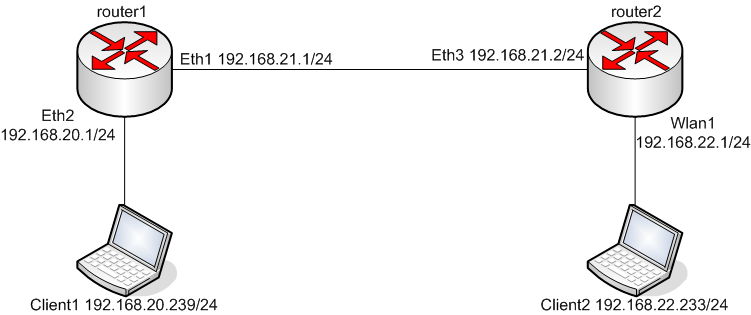
Static Routing Multiple Gateway – Mikrotik
Sebelumnya udah pernah ditulis di forum.chip.co.id
Berikut adalah how-to, tutorial untuk melakukan static routing ke dua gateway yang berbeda (multiple gateway), dengan menggunakan Mikrotik Router OS, dan contoh kasus sebuah warnet yang menggunakan koneksi ADSL untuk international dan koneksi wireless untuk IIX…
How to limit a user to a given amount of traffic?
Diambil dari http://forum.mikrotik.com/viewtopic.php?f=9&t=20420
:local sum; :local traf;
:set sum 0
/ip firewall rule forward {
:foreach i in [find] do={:incr sum}
:for i from=1 to=$sum  do={
:set traf [get [find comment=("user" . $i)]
bytes]
:set traf ($traf/1073741824)
:if ($traf>1) do={:log facility=System-Info \
message=("user" . $i ." exceeded 1Gb limit!")}
}
}
Subscribe to:
Posts (Atom)